
Grade options
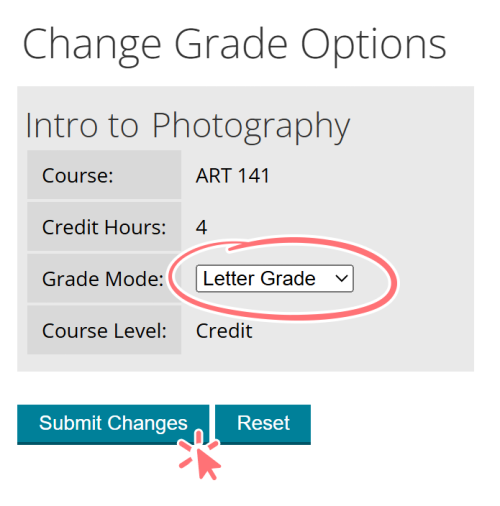
Changing your grade option in MyPCC
Credit students choose between three grade options, provided the department has permitted all options:
- Letter grade: A, B, C, D, F
- Pass / no pass: P, NP
- Audit: Aud (with instructor permission)
How to change your grade option
If you don’t choose a grade option, you’ll automatically have the default option for that class. The default is generally a letter grade, but it could be pass / no pass.
- Go to the MyPCC My Courses tab
- Click Change grade option in the links section
- Change your grade option in the dropdown and click submit changes
When to change grade option
- Letter grade and pass / no pass: for most classes, the deadline is the tenth Saturday of the term. For short-term classes, the deadline is sooner. To see the deadline for your class, go to the MyPCC Home tab and click see drop, withdraw and grade option deadlines in the term-to-term checklist.
- Audit: by 5pm on the second Tuesday of the term (see academic calendar).
Things to consider when choosing grade options
- It’s best to take required classes, like those required for your degree, for a letter grade.
- A pass grade may not satisfy the prerequisite of C or better required for entry into some classes.
- There is a limit to the number of pass credits that can apply towards a degree or certificate. Check with your advisor about the limit for your program.
- There is a limit to the number of pass credits that will transfer to other schools. Check with an advisor at the institution you plan to transfer to.
- Learn more about grading guidelines.
Auditing a class
With instructor permission, some classes allow students to attend without receiving a grade or credit for the class. You must pay full tuition and fees, and financial aid doesn’t cover audited classes.
- If you haven’t taken a credit class at PCC in the last year, apply for admission before the application deadline. (If you’ve taken a credit class recently, skip to step 3.)
Term you want to start Application deadline Fall 2026 (September) Wednesday, September 9 Winter 2027 (January) Monday, December 14 Spring 2027 (March) Wednesday, March 17 Summer 2027 (June) Wednesday, June 9 - Once you have been admitted, complete the online orientation, then set up your MyPCC account.
- Email the instructor from your PCC email account to see if an audit is allowed. Include your G-number and the CRN.
- If your instructor approves the audit request, they must forward your email request, along with their approval, to enroll@pcc.edu. This must be submitted by the audit request deadline (5pm on the second Tuesday of the term).
- Pay full tuition and fees for the class.
Instructors are expected to state on their handouts any specific audit requirements. Auditing a class does not satisfy the requirements for entry into classes where prerequisites are specified.
Seniors auditing a class
Seniors may audit and receive free tuition for credit classes taken for an audit grade. With instructor permission, some classes allow students to attend without receiving a grade or credit for the class. If the instructor approves you pay only fees for the class and the tuition charges are removed. Seniors looking to do a senior audit do not have to meet the prerequisites of the class they are auditing in order to take the class with an audit grade. See more about senior discounts.
See the complete policy here: Academic Policies and Standards Grading Guidelines.