
How to get on a waitlist
Many PCC classes have a waitlist – a line to get into a full class. When a student in the class drops, a student from the waitlist will be automatically added. You can see if a class has seats available on its waitlist in MyPCC.
See if a waitlist is available
- Click Register for classes in the term-to-term checklist in MyPCC
- Find your class: search by subject or use the advanced search (if you’re on a phone mobile screen button look for the Show / Hide button at the bottom of the screen)
- The Status column shows how many seats are open on the waitlist

The status column shows remaining spots in the class
Add yourself to a waitlist
- Click Register for classes in the term-to-term checklist in MyPCC
- Find your class and click the add button (if you’re on a phone mobile screen button look for the Show / Hide button at the bottom of the screen)

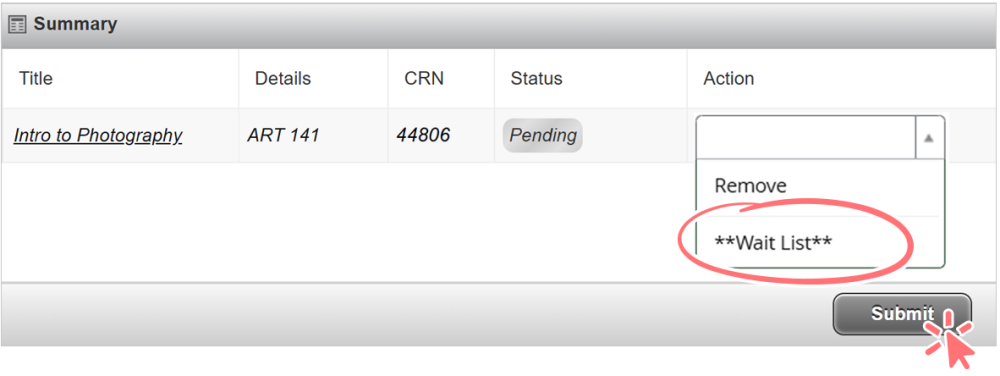
- In the summary section, choose waitlist from the dropdown and click submit
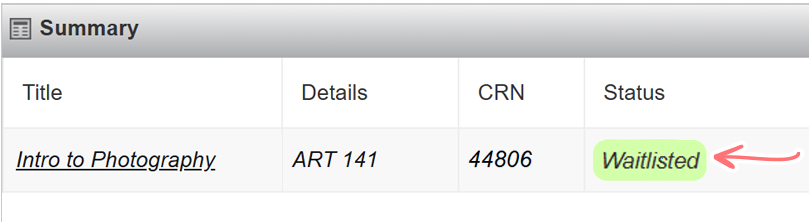
- Check the confirmation message to confirm waitlist status
I’m on a waitlist, now what?
If a seat opens up, the first person on the waitlist will be automatically enrolled in the class. If you’re added from the waitlist, you’ll get an email at your @pcc.edu account. If it’s after the payment due date, you may need to pay right away so you don’t get deleted.
If you’re registered for a course, you cannot be moved from the waitlist for another section of the same course. While the system will allow you to be on a waitlist, you will be dropped from the waitlist rather than added to the course because students are not permitted to be registered for two sections of the same course.
Waitlists after a class has started
If you’re still on a waitlist the day the class begins, you must get instructor permission to take the class:
- Go to the first day of class (for online classes, email the instructor on the first day of class).
- Ask your instructor if they will give permission for you to register for the class. If they agree, ask your instructor to run a late add override and a class capacity override using your G number.
- Once the instructor has run these overrides, you will get an email letting you know that you can register for the class. See your overrides by clicking See when (and if) you can register on the MyPCC Home tab.
- Register for the class in MyPCC. You must register for the class by the late registration deadline (see when to register). The late registration deadline is typically the same as the drop deadline. This means you must be certain you want the class, as you won’t be able to drop it after that date. If you are on the waitlist for the specific course CRN you are attempting to register for, you must first remove yourself from the waitlist before you can add the class.
 Waitlists and financial aid
You need to be enrolled in a certain number of credits to get financial aid. Since waitlisted classes don’t count towards your enrollment level, this may affect your award. Contact the Financial Aid Office for advice on managing your enrollment.