
Homepage
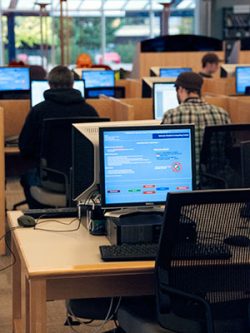 The Student Computing Center (SCC) is open to all currently registered PCC students. Centers are located at Cascade, Rock Creek, Southeast, and Sylvania Campuses. Available software includes internet browsers, word processing, desktop publishing, spreadsheets, databases, webpage authoring, presentations, and programming languages.
Students log in with their normal username and password (note: don’t include @pcc.edu in your username).
If you need help in the lab, Lab Assistants and Lab Coordinators are available to assist with the basics in applications like Word and Excel. For training beyond the basics, see Tech @ PCC. For help with devices, internet service, and technical skills, see one of our Digital Navigators.
Hours
Computer labs are open the same as our Library hours.
Software
All computers have the following software: 7-Zip, Adobe Acrobat Reader, Freedom Scientific Fusion (JAWS and ZoomText), Google Chrome, Microsoft Office (Word, Excel, PowerPoint), Natural Reader, Read and Write, and VLC Media Player.
Cascade
- Location: Cascade Library Building, First and Second floor
- Lab Coordinator: Trung Trinh
- Devices: 40 Windows computers and 2 Mac computers
Specialty software locations: Workstations #13 – #21
| Software type | Workstations available |
|---|---|
| Adobe Creative Cloud 2023 | All computers |
| ArcGIS Pro, ArcGIS Desktop, Google Earth | #13 – #21 |
| MATLAB R2016b | #13 – #21 |
| Python, JetBrains: WebStorm, PyCharm | #13 – #21 |
| Visual Studio 2016 | #13 – #21 |
Rock Creek
- Location: Building 9, 2nd floor
- Lab Coordinators: Collette Keele, Dante DeRenzis
- Phone: 971-722-7510
- Devices: 50 Windows workstations, 2 MacOS workstations, 3 USB-C docking stations
Specialty software locations: Workstations #25 – #30
| Software type | Workstations available |
|---|---|
| Python, PyCharm Pro, Google Earth Pro, MS Project | #25, #26 |
| SolidWorks 2024, ArcGIS Pro, Bluebeam, Chief Architect | #27, #28 |
| Adobe Creative Cloud, Vectorworks | #29, #30 |
Started Summer Term 2025, specialty software used in CIS/CADD/GIS classes will be accessible through Propeller Virtual Desktop.
Southeast
- Location: Southeast Library Building, First Floor
- Lab Coordinators: Emily Ponce, Kareem Tahomi, Edward Johnson
- Devices: 65 Windows computers and 3 Mac computers
| Software type | Workstations available |
|---|---|
| Adobe Creative Cloud | All computers |
| AutoCAD 2024, Revit 2024, Solidworks 2023 | #1 – #7 |
| Brackets, CodeBlocks, GeoGebra Classic, Putty, Python 3.12 | All computers |
Sylvania
- Location: Sylvania Library Building, First Floor
- Lab Coordinators: Eduardo Dulanto Hurtado, Zach Jones
- Devices: 115 Windows computers and 2 Mac computers
- Accommodations: 1 family room with a Windows computer
What technology do you need to succeed at PCC? Get answers here! Read Tech @ PCC or come in and see us!
Accessibility
Each campus maintains an inventory of accessibility equipment. Check your campus computer lab for specific equipment. You may also order equipment through Accessible Ed & Disability Resources. Hardware and software may include the following:
- Adjustable desks: equipped with electric motors that allow the height to be adjusted with the push of a button.
- Ergonomic chairs: tailored to fit the natural curvature of the spine, support proper posture, and adapt to the user’s movements.
- Large screen monitors: computer displays with significantly larger screen sizes compared to standard monitors.
- DaVinci Enhanced Vision workstations: desktop magnification with text-to-speech. To see user guides, choose DaVinci Pro from the dropdown here: Enhanced Vision user manuals.
- Freedom Scientific Fusion: combines JAWS and ZoomText for screen reading, screen magnification, and visual enhancements.
- Natural Reader: convert written text to spoken words for help with reading, learning a language, and auditory learning.
- NVDA: screen reader software to enable blind and visually impaired users to interact with Windows computers.
- JAWS: screen reader assists with navigating login screen on SCC computers. See how to use JAWS in the computer lab.
- OrbitNote Chrome extension: annotate PDFs with highlights or drawings, text-to-voice tools, comments, and audio streams.
- Read & Write Chrome extension: assists with studying and research for those with learning difficulties and literacy challenges.
Printing
PCC uses PaperCut to provide access to computer lab printers. Students start each term with $10 in their PaperCut account (equal to about 100 double-sided pages). Additional printing can be purchased by card through the PaperCut system. Printers use standard 8.5 × 11″ white 20lb copy paper.
Use PaperCut on a PCC Chromebook
Visit this page on your Chromebook and click the campus below where you want to print:
Use PaperCut on your personal device
Your device needs to connected to PCCWifi and have the Mobility Print app installed (compatible with Windows, Mac, iOS, Chromebook, and Android). Click the campus where you want to print, then the icon for your device:
- Cascade Mobility Print App
- Rock Creek Mobility Print App
- Southeast Mobility Print App
- Sylvania Mobility Print App
Get more help installing PaperCut on your device: Android, Chromebook, iOS, Mac OS, Windows.
More help printing
See more about printing on campus arrow right
Requesting software
Faculty chairs and Deans can use the IT Service Request page to access the Classroom Software Request form, allowing faculty to request software in PCC Classrooms and Computer Labs. All software requests must be approved by a faculty department chair or division dean. Software installation only takes place between terms and must be requested by the 5th week of the prior term to ensure enough time for various teams to ensure functionality and accessibility requirements are met.