
Online Learning Ecosystem Quarterly Updates for Spring 2026
Posted by Andy Freed | Start the discussion
Quarterly Learning Ecosystem Updates for Spring 2026
We’ve collected a list of recent updates and changes to the online learning ecosystem for spring term. Updates are listed under each application. Updates are not exhaustive but rather focus on the items that are most important to instructors and students or have the most impact.
D2L Brightspace
Respondus LockDown Browser
You can now use Respondus LockDown Browser on specific quizzes to improve security during the assessment. LockDown Browser prevents visiting other websites or applications, printing, and copying and pasting during the quiz. This tool is being added to improve quiz integrity and combat the use of AI tools during your exams.
Discover available for students
Students can now find and self-enroll in courses that have been set up to use Discover. So far, we only have one class, Math Skills Videos, but anticipate more to come. Please do not add your credit classes to Discover for student privacy reasons.
Improvements to Gradebook Navigation
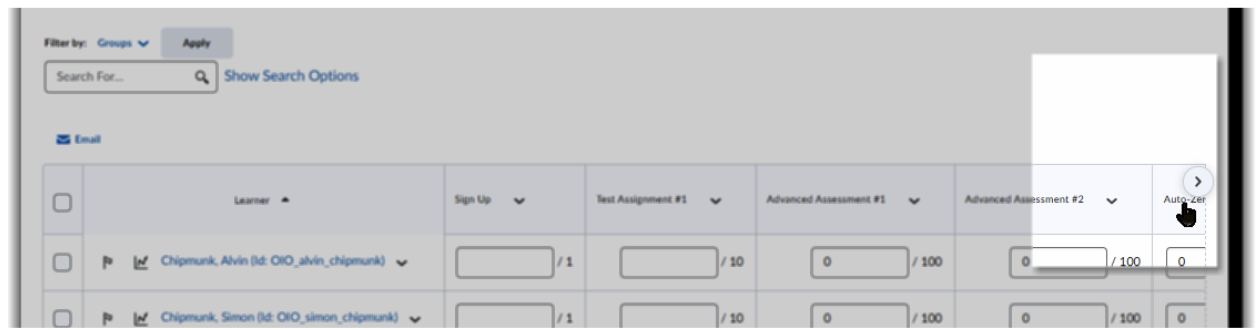
Small arrow buttons have been added to the gradebook to make it easier to navigate horizontally in large gradebooks.
Kaltura My Media
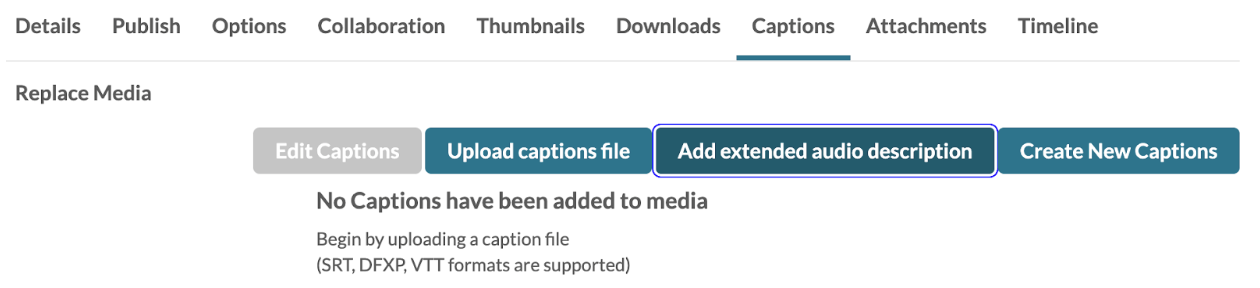
Adding Extended Audio Descriptions
You can now add Extended Audio Descriptions to your media entries in My Media.
Yuja Panorama
Winter term accessibility scores
The following departments had an average course accessibility score over 90!
- 9CWD
- 9PH
- ASL
- BA
- CADD
- CIS
- CJA
- COMM
- CS
- DA
- DH
- EC
- ED
- EMS
- ESR
- FN
- GD
- GER
- GRN
- HE
- HEC
- HIM
- HST
- IRW
- ITP
- J
- LIB
- MA
- MP
- MSD
- MT
- NAS
- OMT
- PE
- PHL
- RD
- SOC
Spring course scores are being collected and shared in preparation for the April 24, 2026 ADA compliance deadline. If you need support in your class, please reach out to dlhelp@pcc.edu or schedule an appointment with one of our ITS.
H5P
Interface improvements
H5P’s interface has been improved to make it easier to create and edit activities within Brightspace. The larger interface is a welcome improvement according to early adopters on the team.
H5P OER Hub
You can now search from a large library of H5P activities and share your own with the world with OER Hub. This new feature lives within the H5P interface and makes it much easier for you to share your activities with coworkers and the rest of the world alike. I’m really excited about this feature.
Learners can retry Fill in the Blanks after fully correct answers
Learners can now retry Fill in the Blanks questions even if their previous submission was fully correct, supporting active recall, reinforcing learning, and building confidence and mastery.
Other bug fixes
There are other fixes and updates in the release notes.
VoiceThread
VoiceThread single sign-on now uses the college’s EntraID platform for authentication. While few users log in to VoiceThread directly, those who do will now use the standard process for other PCC tools.
Zoom
Zoom 7.0 is coming. The interface updates will slowly roll out to users over the coming months. We don’t have very good information to share yet, so we’ll provide more information as we receive it. So far, this preview is all we have to work with. It will have the biggest impact on admins and support staff who manage multiple tools, but we haven’t seen the actual updates yet. Sorry for the cryptic update.
About Andy Freed

I'm the Director of Learning Technology & Innovation (LTI!), where I oversee our infrastructure, technical support, and the innovation hub. I've been with the College since 2001 and have worked in several positions, from technical suppo... more »
Start the discussion
PCC offers this limited open forum as an extension of the respectful, well-reasoned discourse we expect in our classroom discussions. As such, we welcome all viewpoints, but monitor comments to be sure they stick to the topic and contribute to the conversation. We will remove them if they contain or link to abusive material, personal attacks, profanity, off-topic items, or spam. This is the same behavior we require in our hallways and classrooms. Our online spaces are no different.