
Payment plans
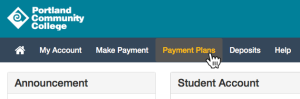
Signing up for a payment plan in PCC-Pay
These interest-free payment plans are a smart way to spread out the cost of your education. Use the tuition calculator to estimate what your payments will be.
A new plan must be set up each term. You must owe at least $150 in eligible charges to sign up for a payment plan.
-
Sign up in PCC-Pay
During the enrollment period, go to MyPCC arrow right Paying for College tab arrow right PCC-Pay arrow right Payment Plans tab arrow right Enroll in Payment Plan.
-
Choose a plan
A $20 per term non-refundable fee is due on enrollment. If you make a down payment, it will reduce each scheduled payment equally – it will not pay off your first installment.
-
Be ready for payments
Payments are deducted from your bank account on the due dates. Make sure there are sufficient funds in your account: there’s a fee of up to $25 for missed payments.
Payment plans: spring term
| Type of plan | Description | Enrollment period | Installment due dates |
|---|---|---|---|
| 3 installments (monthly) | Payments due every 4 weeks starting 2 weeks before term | Feb 23 to Apr 4 |
One third due: Mar 16 Balance due in 2 installments on Apr 13 and May 11 |
| 5 installments (biweekly) | Payments due every 2 weeks starting 2 weeks before term | Feb 23 to Apr 4 |
One third due: Mar 16 Balance due in 4 installments on Mar 30, Apr 13, Apr 27, and May 11 |
| Late enrollment | Pay 50% on enrollment and 50% 6 weeks later, designed for students in late-starting classes | Apr 5 to Apr 29 | 50% due on enrollment in plan Balance due on May 11 |
Changing your payment method
You can change your payment method until four days before a payment is scheduled to be taken out of your account. To change your method, first add the new payment method and then change your plan to use the new method. Log in to PCC-Pay, click Payment Profile, then Add New Payment Method. Go back to the home screen and select your payment plan, then click Update All Methods at the bottom of the page to select the new payment method.
Class schedule changes
If you add or drop classes, it’s no problem! Your scheduled payment will be automatically adjusted and you’ll get an email with the new amount.
Payment plans for past due accounts
There are 3, 6, and 12 installment plans for students who were unable to pay during the term. The plan has to be set up within 90 days of the end of the term. You won’t be able to register for classes until your balance is paid in full. Contact us to set up the plan. When you contact us, you’ll need to have payment ready for the first installment plus a $25 set up fee.
Other functions in PCC-Pay
- Update your payment profile: Click My Account, then My Profiles
- Pay off plan: click Payment Plans, then Pay Off Plan
- View your agreement: click Payment Plans, then View Agreement
- View current installment status: click Payment Plans and scroll down