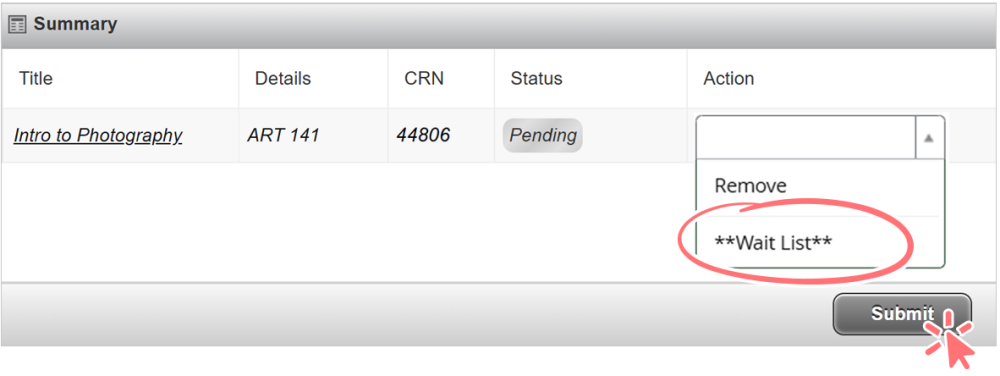
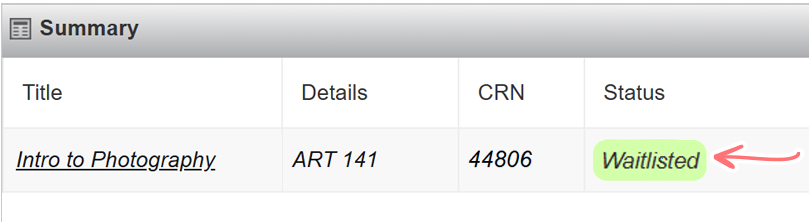
Waitlist
P.O. Box 19210, Portland, OR 97280 | FAX: 971-722-4988 | enroll@pcc.edu | Office hours: 8am-6pm Monday-Thursday, Friday 8am-4pm
Registration Helpline: 971-722-8888, Option 2 | Helpline hours: 9am-5pm Monday-Thursday, 9am-4pm Friday
If you put yourself on the waitlist for a class and a space becomes available, you will automatically be taken off the waitlist and registered for the class! You will get an email in your MyPCC email account that tells you when you have been automatically moved from the waitlist into the course as soon as the change occurs. You can check your waitlist status daily by checking your Student Detail Schedule on MyPCC.
When you view your Student Detail Schedule, there are several codes that describe your registration status.
- RW:
- Registered via the Web
- RE:
- Registered in some way other than the Web
- WL-2:
- Waitlisted and 2nd in line for the class
- The number after the letters WL displays your order in the waitlist. For instance, if you are WL-1, you will be the 1st person added to the class. If you are WL-3, you will be the 3rd person added to the class, etc.
Note: Students are moved from the waitlist to the class only when a space in the class becomes vacant because another student dropped the class.
What if I don't get into the class?
If you do not get into a class for which you are waitlisted, you have the following options.
- Take the class another term.
- Drop yourself from the waitlist and find another class to take that has spaces available.
- Attend the first day of class and ask your instructor for an online registration override. Take note of the following as you will then need to register yourself for the class.
- After your instructor completes the registration override you will receive an email to your PCC email notifying you that the override has been processed.
- You then need to register for the course online using MyPCC within the late registration period
- You will need to drop the waitlisted class first, otherwise the system will not allow you to proceed with registration. After the waitlist is dropped you can add the class.
- Be sure to verify the CRN for the class to ensure you are registering for the correct section.
- Make same day payment arrangements in order to keep your course registration and not be deleted for non-payment.
If a student who is registered does not show up to the first day of class, the instructor can offer that seat to someone else and will use the waitlist to determine who should be added to the class in priority order.
Any late registration after the course drop deadline cannot be dropped for a refund. A withdraw “W” mark will be given and full payment of tuition/fees is required.
Frequently Asked Questions
Click on a frequently asked question below to get the answer. Click again to hide answer.
- Can I register for a waitlist with a time conflict?
- No, you cannot register for two waitlists that have a time conflict or register for a class and a waitlist that have a time conflict.
- Can I sign up for multiple waitlists for the same class?
-
Yes, you can sign up for multiple wait lists but as soon as a space becomes available in one of the classes, you will be added to that class and dropped from any other waitlist(s) that have the same subject and course.
- If I haven’t met the prerequisites, can I register for a class or for a waitlist?
-
No, you cannot register for a class or for a waitlist if you have not met the prerequisites or are not in progress towards successfully completing the prerequisites for that course.
- What are my chances of getting into a class if I am on a waitlist?
-
It depends. Many times classes have students who register and then drop the class before the term begins. If you are near the top of the waitlist and there are still a few days before the class begins, it is likely that you may get a seat in the class. However, if you are near the bottom of the waitlist, your chances are much less likely. If there are still multiple weeks (or months) before the term begins, the basic recommendation is to check your waitlist status frequently to see if your status has changed. You can do that by viewing your schedule in MyPCC.
- Will I find out if I got into a class?
-
Yes, an electronic notification will be sent to your MyPCC email as soon as you have been moved from the waitlist into the class. It is recommended that you check your MyPCC email daily to look for this notification as well as other important notifications that come from the college. The subject line of the email will contain specific information such as: Notification of Registration Change.
- How often can I check on my waitlist status?
-
Daily. The system will check status and automatically update your registration once per day- usually overnight- so you do not need to check your status more often than once per day. You can check your status by looking at your “student detail schedule” and viewing your waitlist status there.
- Can I register for one course and be on a waitlist for the same course?
-
No. If you are registered for a course, you cannot get on a waitlist for the same course that meets at another time. While the system might allow you to be on a waitlist initially, you will never be moved into the course from the waitlist if you are already registered in that course.
- Can I register for a waitlist if I would exceed the maximum credit hours when allowed into that class?
-
No. While the system might allow you to be on a waitlist initially, you will never be moved into the course from the waitlist if that class would push you over the maximum hours available to a student- which is 19 credits. If you want that class and are on the waitlist, you may benefit from dropping another class so that you might be put into the waitlisted class if space becomes available. Note: You may also benefit from talking with an advisor about this. In very special cases, they are willing to allow for an exception for the maximum credits a student takes.
- How late can I register for the waitlist and still be moved into a class?
-
The automatic fill system for the electronic waitlist will stop based upon the following schedule:
If your class begins on Auto-enrollment into a class ends on the prior Monday Sunday (prior to 8am) Tuesday Monday (prior to 8am) Wednesday Tuesday (prior to 8am) Thursday Wednesday (prior to 8am) Friday Thursday (prior to 8am) Saturday Friday (prior to 8am) Sunday Saturday (prior to 8am) By 8am of the morning following the automated enrollment, you will know if you have been placed into the course or not. The easiest way to find out this information is to log into MyPCC and check your student detail schedule. If you were placed into the course or you were removed from the waitlist for another reason, you will receive an email notification. Note: all distance learning classes officially begin on the first day of each term.