
Online Learning Ecosystem Quarterly Updates for Summer 2026
Posted by Andy Freed | Start the discussion
We’ve collected a list of recent updates and changes to the online learning ecosystem for spring term. Updates are listed under each application. Updates are not exhaustive, but rather focus on the items that are most important to instructors and students or have the most impact.
D2L Brightspace
Respondus LockDown BrowserYou can now use Respondus LockDown Browser on specific quizzes to improve security during the assessment. LockDown Browser prevents visiting other websites or applications, printing, and copying and pasting during the quiz. This tool is being added to improve quiz integrity and combat the use of AI tools during your exams.
Quizzes UI Improvements
The quiz evaluation experience now includes an Incorrect filter that lets instructors quickly view quickly view answers marked incorrect. Feedback fields automatically expand as needed, providing more space to review and enter feedback. You can now filter the quiz questions to review only the questions a learner answered incorrectly. Helps instructors identify trends and determine whether updates to questions or instructional materials are needed.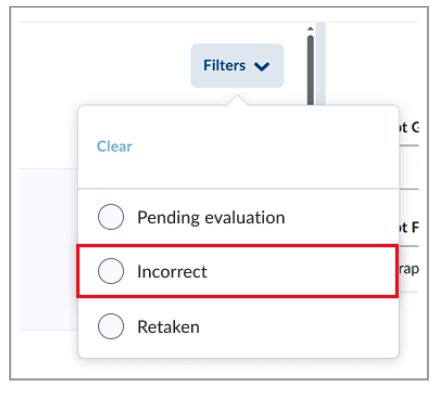
- Improves the consistency and usability of the Import options in Browse Question Library.
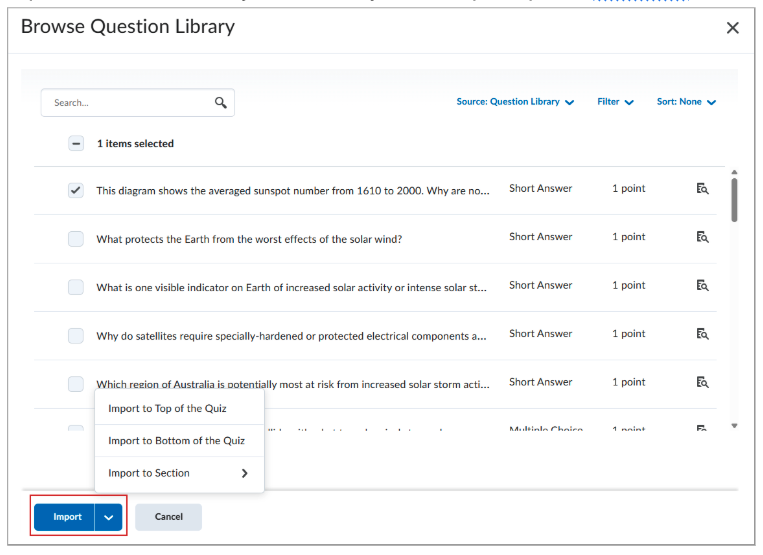
- Available import options vary depending on whether the quiz contains sections:
- The main Import action remains a button for quizzes with no sections.
- The Import to Section option is now a separate button for quizzes with sections.
- Available import options vary depending on whether the quiz contains sections:
New Content Experience
We are starting the evaluation of D2L’s “New Content Experience” (NCE) update, which is the replacement for the current content tool. There is no deadline yet, but NCE has been available for a few years and we’re getting more indications that a timeline is coming. NCE offers a larger interface for students to view and interact with course materials. We still have extensive review work to do and will share more as we learn.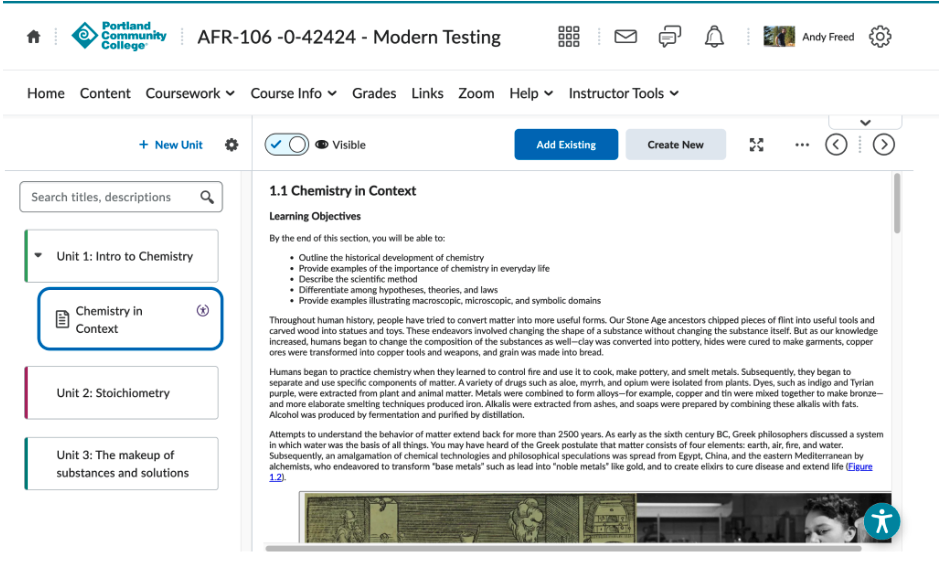
H5P
Interface improvements
H5P’s interface has been improved to make it easier to create and edit activities within Brightspace. The larger interface is a welcome improvement according to early adopters on the team.
H5P OER Hub
You can now search from a large library of H5P activities and share your own with the world via OER Hub. This new feature lives within the H5P interface and makes it much easier for you to share your activities with coworkers and the rest of the world alike. I’m really excited about this feature. Shoot me an email to let me know what you think.
Digital Courseware Integrations
Also known as “LTIs” or 3rd party integrations.
- MyOpenMath – Updating to LTI 1.3, Old links will continue to work until we retire the deprecated LTI 1.1 link. Please update your courses with the new links.
- Films on Demand – Updating to LTI 1.3. Old links will continue to work until we retire the deprecated LTI 1.1 link. Please update your courses with the new links.
- Respondus LockDown Browser – Updating to LTI 1.3
- Vista Higher Learning – New LTI 1.3 integration for Spanish & French
- Currently evaluating ADAPT from LibreTexts
You can find documentation on these digital courseware titles and see the integration request process in Spaces.
Kaltura
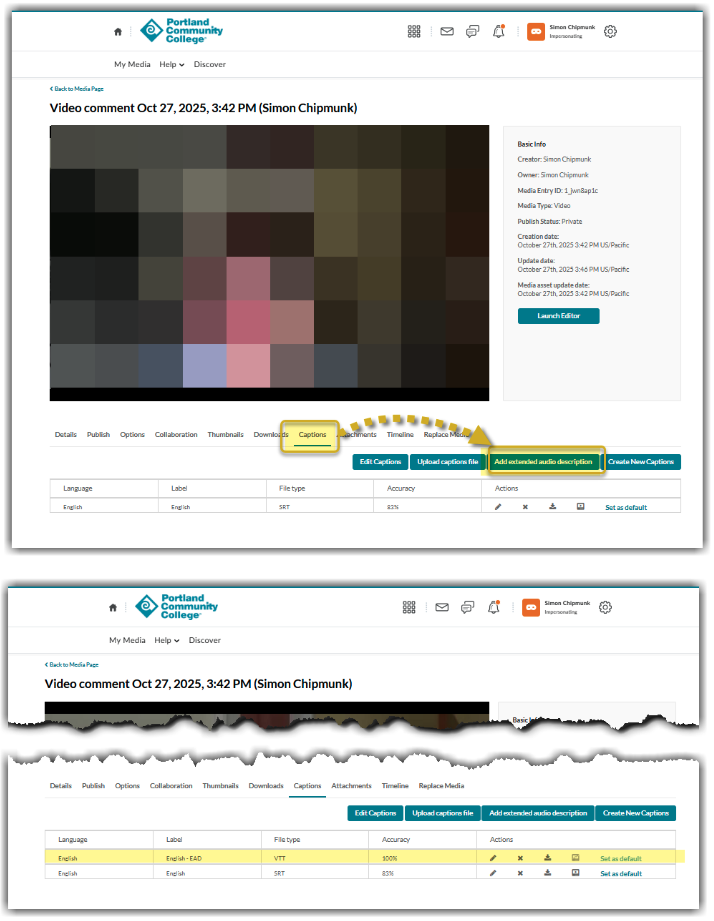
- Extended Audio Descriptions (EADs) can now be added by end users. Once processed, end users can also use the caption & enrich editor within My Media to update the EADs.
Zoom
New “Simplified” Web Interface
Zoom has released a new web portal interface (portlandcc.zoom.us) that more closely mirrors the client application. We will be allowing folks to “opt-in” to the new experience on June 17, 2026. All users will be required to use the new interface by September 6, 2026.
Zoom AI Companion
By September, we’ll be making Zoom AI Companion available for faculty and staff to enable on their accounts. It will be off by default, but you will be able to enable AI Companion in meetings to take notes and provide a summary of your Zoom meeting. If you would like to try this before September, email dlhelp@pcc.edu for access.
About Andy Freed

I'm the Director of Learning Technology & Innovation (LTI!), where I oversee our infrastructure, technical support, and the innovation hub. I've been with the College since 2001 and have worked in several positions, from technical suppo... more »
Start the discussion
PCC offers this limited open forum as an extension of the respectful, well-reasoned discourse we expect in our classroom discussions. As such, we welcome all viewpoints, but monitor comments to be sure they stick to the topic and contribute to the conversation. We will remove them if they contain or link to abusive material, personal attacks, profanity, off-topic items, or spam. This is the same behavior we require in our hallways and classrooms. Our online spaces are no different.