
Online Learning Ecosystem Quarterly Updates for Fall 2025
Posted by Andy Freed | Start the discussion
This post details several updates that have occurred in our online learning ecosystem over the last several months. You’ll see updates that we think will be of the greatest interest to instructors.
D2L Brightspace
- Updating Single Sign-On platform: We will be updating D2L to use IT’s newer authentication tool, Microsoft EntraID, on Wednesday, October 22nd. This is the same platform used for other enterprise tools like MyPCC, Zoom, Workday, and many more. The change will require Multi-factor Authentication for faculty and staff initially, and will be added for students at a later date.
- Add or remove Bulk Feedback on assignment and discussion submissions: Enables instructors to provide bulk feedback to learners directly within the Assignments and Discussions submission pages, and to retract feedback in bulk actions, too.
- Add feedback in bulk on the Submission page
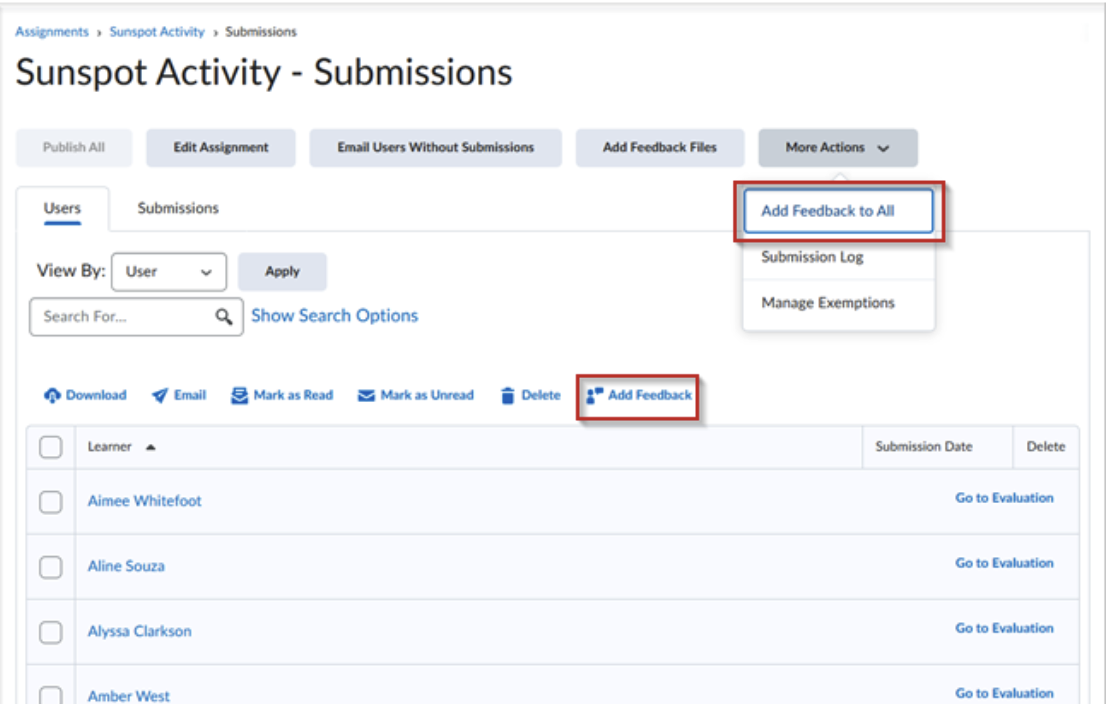
- You can now draft, update, and apply feedback to multiple students at once—whether saving new comments, editing drafts, or updating published evaluations. Use “Add Feedback” for selected students or “Add Feedback to All” for the whole class. You’ll also get a warning if you try to save empty feedback that would overwrite existing comments.
- When giving bulk feedback in Assignments or Discussions, you can use the Brightspace Editor’s Insert Stuff to add links to YouTube, Kaltura videos or other external resources like Google Docs.
- Bulk Retract Feedback
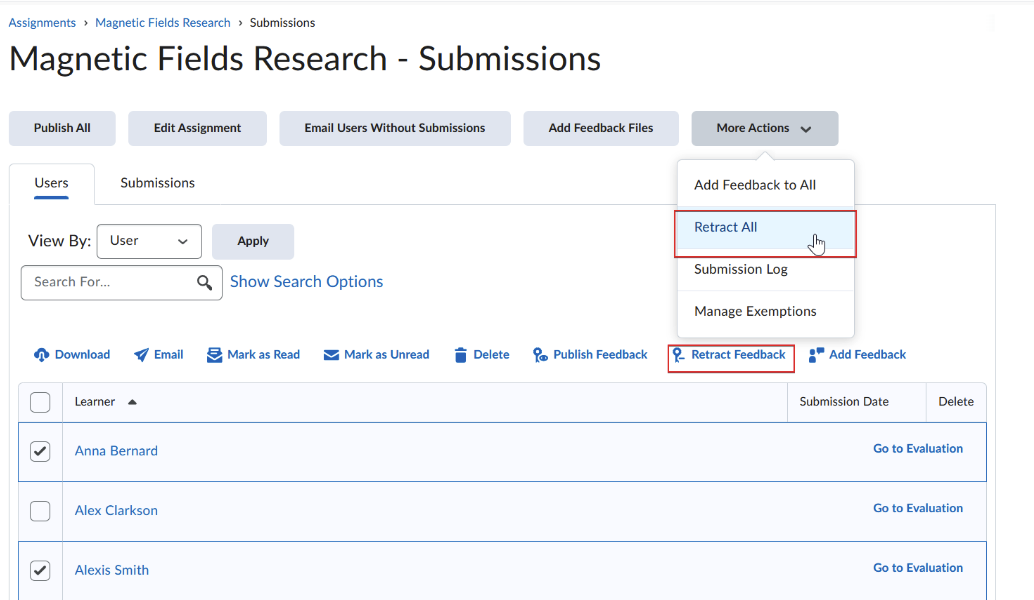
- The Bulk Retract Feedback option allows instructors to choose how many learners to retract published feedback from.
- Add feedback in bulk on the Submission page
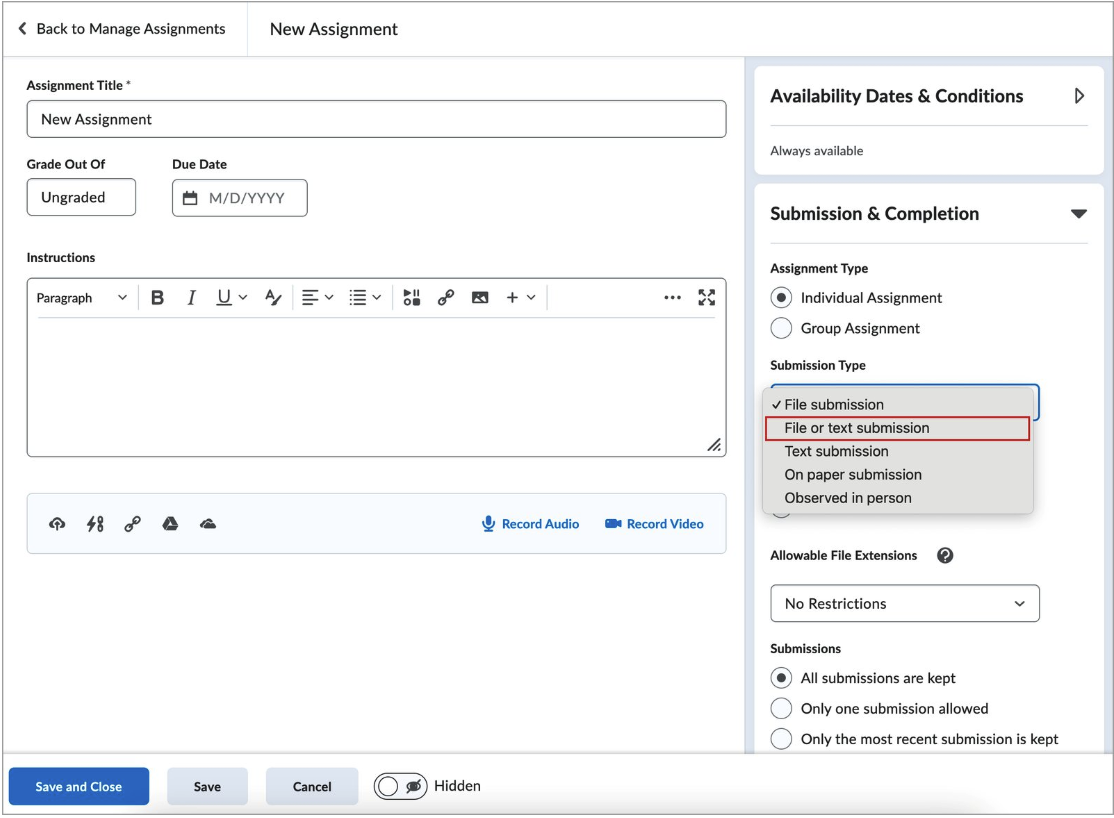
- Assignments – Flexible text or file submission options for enhanced learner choice. This update allows instructors to create a new assignment type that accepts submissions in the form of an uploaded file, text entered in Brightspace Editor, or both.
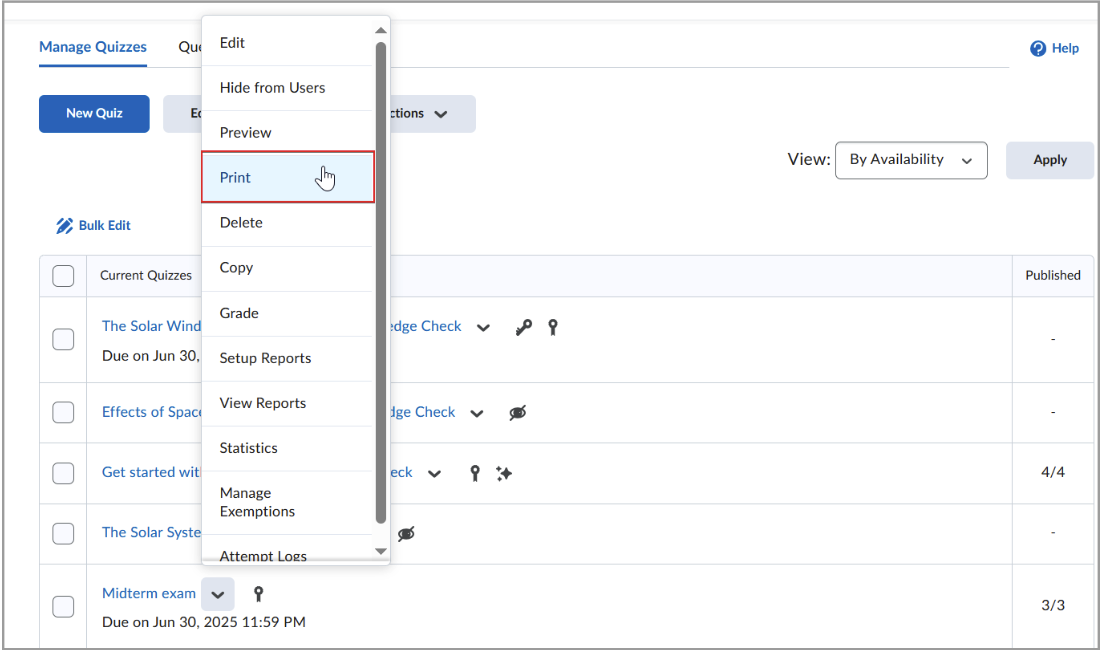
- Print Quizzes: This update provides instructors with a simple way to print an offline quiz that supports all native Brightspace quiz question types, shuffling and randomization options, question pools, multiple versions, and an Answer Key.
- Discover: Discover is a new self-service feature that allows course creators to make their courses “discoverable” to others. You can create courses that are available to anyone, or you can make them available to only certain roles, like other Instructors.
- We have created documentation on how to make your OER course available with Discover so that other instructors can view a copy of your course to see if they want to adopt all or parts of it.
- Inactive Student Visibility in Classlist: Students who have inactive accounts are now visible in your Classlist, allowing you to synchronize your roster in MyPCC with D2L Brightspace Classlist more accurately.
H5P
H5P is now available for all D2L Brightspace users as part of the Creator+ suite! With our updated license, you’ll see additional features like more reporting on student activity, the ability for students to pick up where they left off, and even allow students to author content.
Create H5P Content with Creator+ in D2L Brightspace
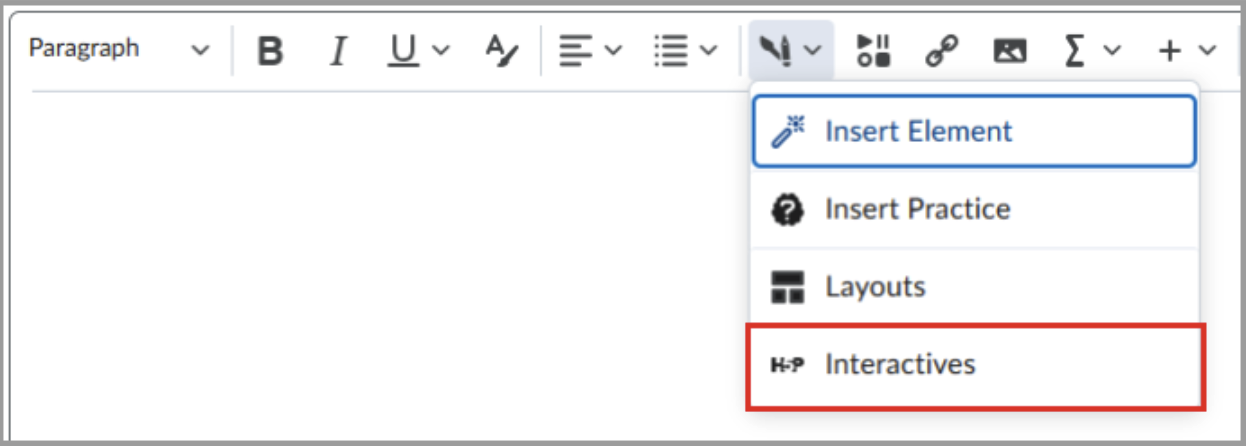
- In the Content tool, create a new content topic or open an existing content topic.
- In Brightspace Editor, click Creator+ Authoring Tools > Interactives.
- Click Add Content.
- Select the interactive you want to create from the available list.
- Complete the fields to configure the interactive.
- Click Save and Insert to add the new H5P interactive.
Existing H5P Users
- Now you will see H5P activities in the Creator+ tools (pictured), instead of the previous Insert Stuff workflow.
- You can edit an H5P interactive that you have already inserted into pages.
Edit Existing H5P Activities
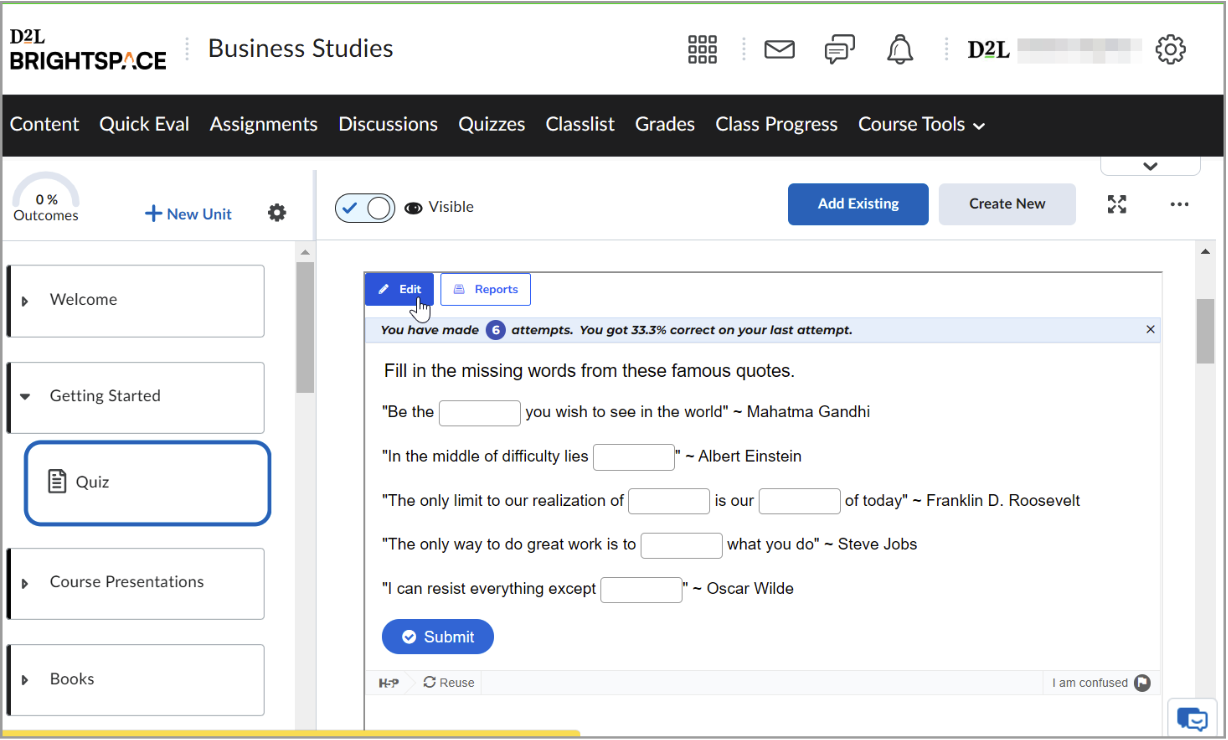
- In Content, navigate to the interactive you want to edit.
- Click Edit to open the editing interface.
- Make the required changes.
- Click Save.
- We are also doing a new review of each of the activity types to verify the level of accessibility (compliance with WCAG 2.1 AA) and with functional testing using assistive technology. We’ll update our documentation and training with the results.
- Smart Import now supports Single Choice Sets and “The Chase” activity types.
- Videos uploaded with Smart import will be automatically captioned.
- H5P has also released a number of fixes for known issues.
Zoom
- Zoom is using PCC’s new Single Sign-on platform.
- This is part of Information Technology’s larger Identity Management Strategy work, and will bring a few key improvements:
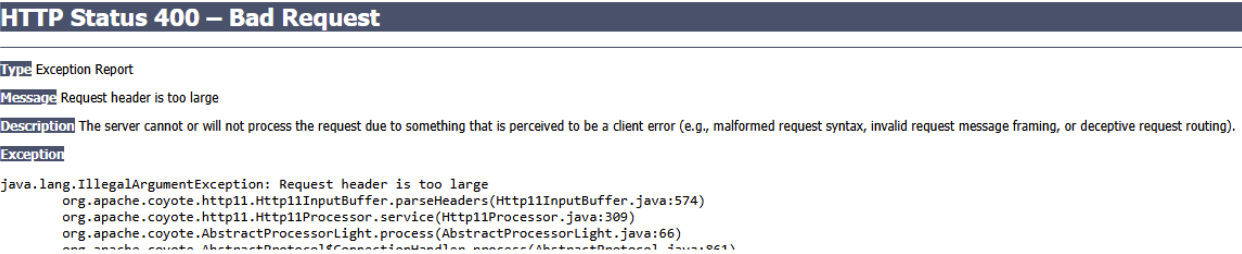
- You will stop getting those pesky Status 400 Error pages that require clearing all of your browser data.
- Zoom AI Companion is available by request. If you’d like to explore using the AI companion to help with meeting summaries, please email dlhelp@pcc.edu.
- IT is rolling out Zoom Phones over the next several weeks. You’ll be able to place calls from your computer using the same app you use for meetings.
Yuja Panorama
Panorama is a critical tool for helping identify and fix accessibility issues with content in your courses. Make sure you check out our workshops and guides to make the most of the tool.
- Earlier this summer, the severity score for font sizes under 10 points was reduced to minor after consulting with AEDR. Overall accessibility scores should be improved from this change for affected files and courses.
- The “Fix Issues” button no longer removes the <head> section of an HTML page (which references style sheets, etc.)
- We can now do bulk course rescans. If you feel like your score isn’t updating, email dlhelp with the full course URL (or OU) and we can rescan it for you.
- Panorama September release notes on updates coming in the next week include:
- Updates to scoring criteria affecting 10 HTML issues from WCAG rules, increasing our ability to comply with federal regulations.
- Improvements to the interface: The accessibility issue remediation process’s redesigned workflow provides bulk remediation capabilities that can handle multiple issues simultaneously, and users can now navigate between issues using arrow buttons, and automatically advance to the next issue after each resolution, reducing the time typically spent on document accessibility compliance across both WYSIWYG content and files.
- Improved Issue Highlighting Accuracy in Document Accessibility Reports: Accessibility issue highlighting in DOCX and PPTX files will now pinpoint the exact location of problems with improved coordinate accuracy. This eliminates cases where highlighting boxes appeared in incorrect sections, making it easier for users to identify and remediate specific accessibility issues within document previews.
- Immersive Reader Will Display Only Link Text Without Raw URLs: The Immersive Reader will now display only the descriptive text of hyperlinks instead of reading both the link text and the full URL address, creating a cleaner reading experience by eliminating lengthy URL announcements that can disrupt content flow.
VoiceThread
- Stacked Assignments: Create an assignment that requires comments on a previous assignment.
- Create a stacked assignment in Content by clicking on the Existing Activities button, selecting VoiceThread, then selecting Assignment Builder.
- Voicethread provides more details on Stacked Assignments.
Kahoot!
Accessible Education and Disability Resources (AEDR) has shared some Tips for making your Kahoots! more accessible. These tips apply to almost any content tool, but there are also some great recommendations for when you are hosting a live Kahoot!
About Andy Freed

I'm the Director of Learning Technology & Innovation (LTI!), where I oversee our infrastructure, technical support, and the innovation hub. I've been with the College since 2001 and have worked in several positions, from technical suppo... more »
Start the discussion
PCC offers this limited open forum as an extension of the respectful, well-reasoned discourse we expect in our classroom discussions. As such, we welcome all viewpoints, but monitor comments to be sure they stick to the topic and contribute to the conversation. We will remove them if they contain or link to abusive material, personal attacks, profanity, off-topic items, or spam. This is the same behavior we require in our hallways and classrooms. Our online spaces are no different.