
How to request a work study position
Work study position requests must be submitted annually. The requests are reviewed by the Work Study Team in the Financial Aid Office. You’ll receive an email if your position is approved. The work study jobs open up May 11, 2026.
The demand for work study positions exceeds the annual federal allocation. As a result, the majority of work study positions are determined in June. Positions are approved based on the job description, federal requirements, and the submission date. To be considered, we strongly encourage you to submit your request on Panther Works as soon as possible, whether your position is intended to begin in the Summer or the Fall term.
Request a work study position
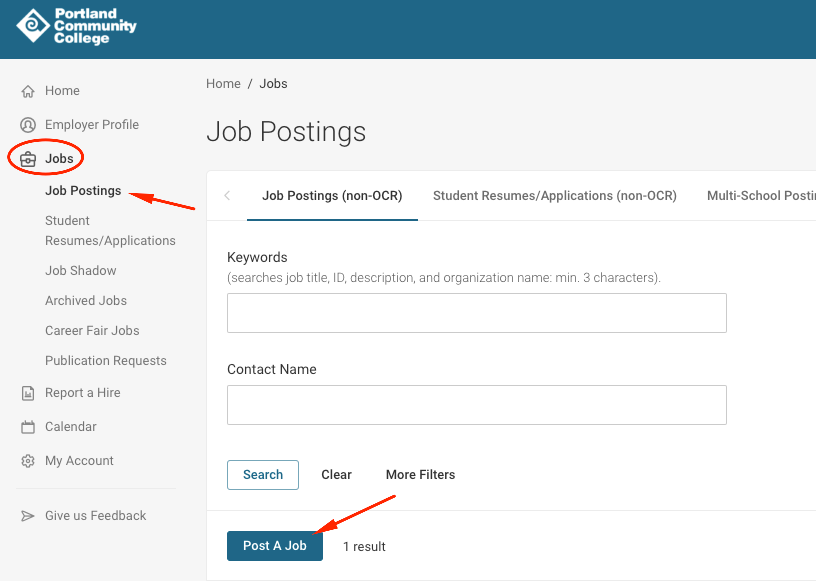
- Log in to Panther Works and click Jobs
- In the expanded menu, click Job Postings
- On the Job Posting page, click the Post a Job button and submit your job
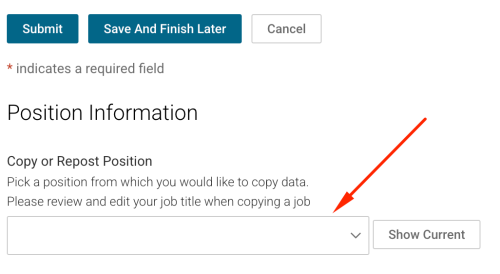
Note: if you had a work study posting in the prior year, you can copy last year’s information and update it for the new year accordingly.
How to create a Panther Works account
If you don’t have access to Panther Works, you must first request access. Begin by creating a profile:
- Visit the Panther Works sign in page
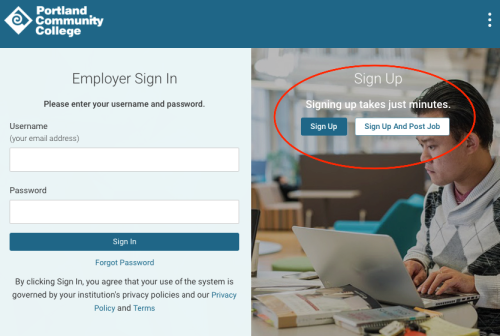
- Click the Sign Up button (if you’re ready to do the work study placement as well, click Sign Up and Post Job)
- Under Organization Name, enter your Department’s Name (e.g., CA Chemistry). Note: your department may already have a profile in the system and will pre-fill information for you. Search for variations of your department name before creating a new one.
- After you submit the form, the Career Services Team will review and approve your profile. You’ll get a confirmation email when this is complete.
You’re ready to start creating student employment placements!