
Proofpoint – ZenGuide
ZenGuide is a mail add-in that allows you to easily report a potential phishing email. With the click of the Report Phish button, a notification is sent to Proofpoint Email Security & Information Security Team for analysis.
How to Report Phish using ZenGuide for Google Mail
The ZenGuide Report Phish Google Mail Add-in allows for the reporting of potential phishing email messages with the click of a button. Follow the directions below on how to report suspicious messages using the ZenGuide Report Phish button.
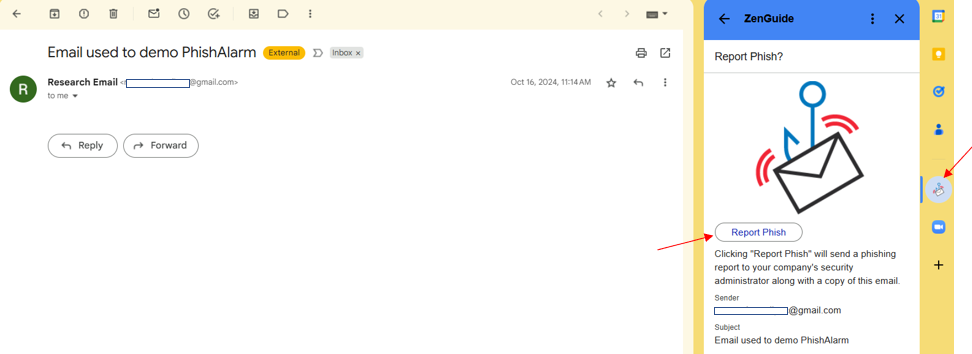
- Open the suspected phishing message
- Click the ZenGuide button located on the right-side panel of the Google Mail Interface. Note: the right-side panel is hidden by default in some web browsers. If so, there will be a small arrow button visible on the bottom right side of the webpage when scrolling. Click this button to show the panel.
- You will receive a confirmation message. Click Report Phish
- After the message has been reported, you will see a ZenGuide verification message thanking you for your report
Benefits
- Makes reporting suspicious emails directly to Information Security quick and easy
Service availability
24/7