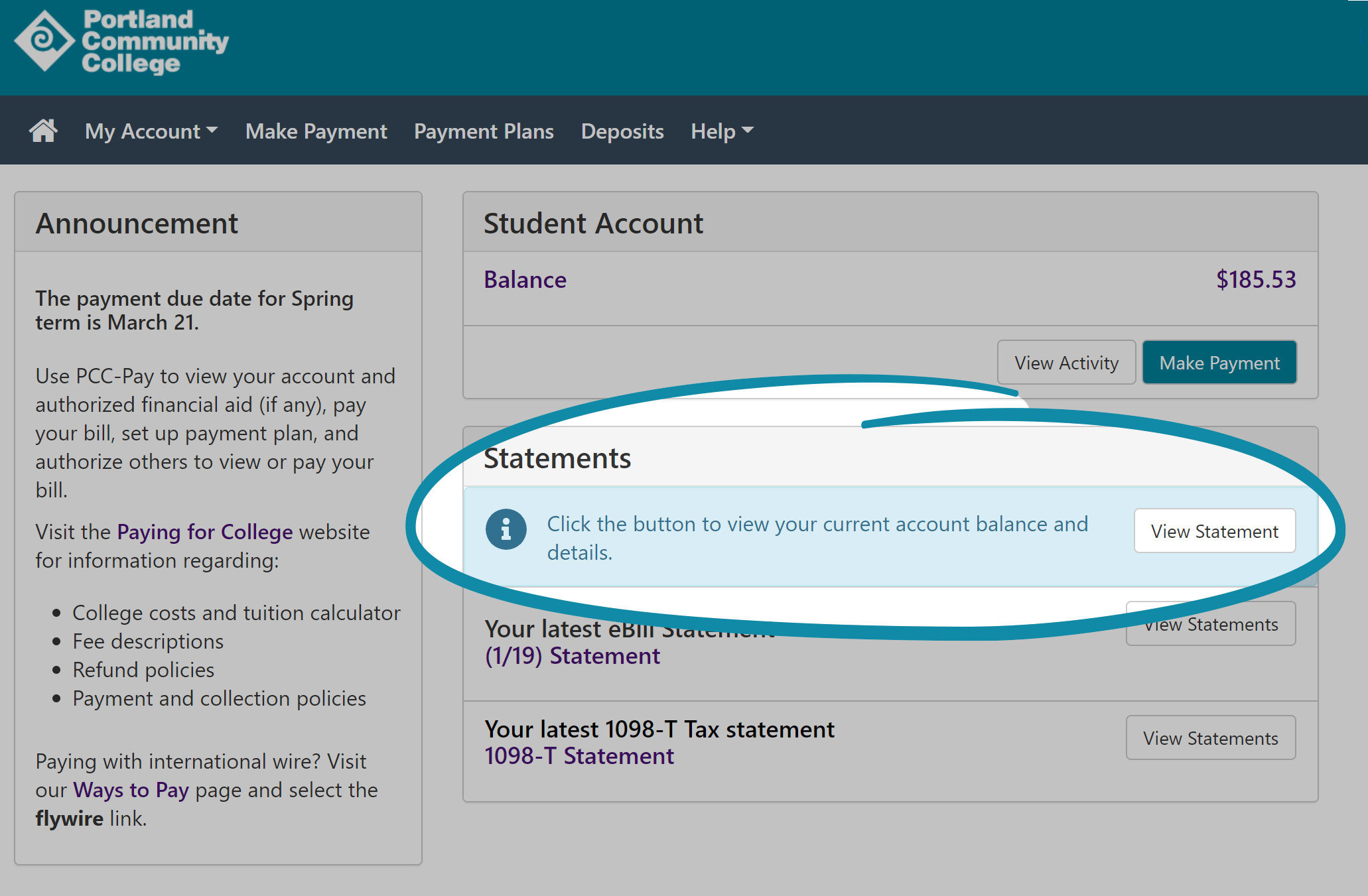
PCC Pay
What is PCC-Pay?
PCC-Pay allows students to view and pay their bills online. To access, login to your MyPCC account and select the PCC-Pay link located on the College Business tab.
- PCC-Pay is safer than most payment options.
- PCC-Pay is faster. eBills are available days earlier than mailed bills.
- PCC-Pay is better for the environment . No more stamps or unwanted paper.
- With PCC-Pay, you can:
- Authorize others to view and pay bill online.
- Pay by eCheck (checking/savings) or bankcard (Visa/MC).
- See your current account charges or billing history.
- Get immediate email notification of all online activity.
- And, it’s all available nearly 24/7/365!
Frequently Asked Questions
Click on a question to get more information.
- How do I use PCC-Pay?
- Login to your MyPCC account, and click on the College Business tab. Look for the 'PCC-Pay View/Pay your Bill' link located in the upper left corner. You will see a number of options listed. To see what you currently owe, click on the "View Accounts" link.
- What are the benefits of PCC-Pay?
-
There are several:
- Enhanced services and data security: PCC-Pay offers many new payment and billing options. It also provides the highest level of data security available in the industry today.
- Common goals: Many functions at PCC are paperless, including admissions, financial aid, grades and student payroll via direct deposit. Electronic billing continues this mission. Peer institutions around the country are now adopting electronic billing as their primary method of billing.
- Web culture: The vast majority of PCC students are familiar and comfortable with the web, and it has become more commonplace to perform many daily transactions and communications via email and the Internet.
- Time and money: eBill and ePayment options are free services available to students and their authorized payers 24/7/365 via the internet. Administrative costs are reduced which helps to keep tuition costs down.
- Is the PCC-Pay website secure?
- PCC respects and protects student records. Your data is encrypted and is certified by VeriSign, the nation's largest online payment verification provider. The technical architecture and security of eBill and ePay utilizes a combination of intrusion detection and firewall systems to protect the network and meets the highest level of Payment Card Industry standards. Therefore, making credit card payments using PCC-Pay is actually slightly safer than paying in person, in class or by mail.
- Is there a fee for PCC-Pay services?
- No. All services are free of charge to PCC students and their authorized payers.
- Do I need to register online to use PCC-Pay?
- No. Even if you don’t register online, you can still view your account, pay online and authorize others to make online payments for you. If you wish to set up your your account to receive eBills, please call 503-977-4234.
Billing
- What is an eBill?
- Instead of sending bills by mail, an email will be sent to your MyPCC account to let you know your bill has arrived. You will access your MyPCC account, select the College Business tab and click on the 'View/ Pay Your Bill' link. All students who have registered using MyPCC will retrieve student account bills electronically.
- Will I get an eBill?
- If you register by the 2nd Friday of the term using using MyPCC, an eBill will be delivered to your PCC-Pay account. eBills are great even for people who don’t like to pay online. It’s one less piece of paper to keep or shred and your billing history is just a few mouse clicks away.
- How is my eBill delivered?
- Notification will be sent to your MyPCC email from pccpay@pcc.edu with a subject line of 'PCC eBill Delivery Notice'. Even if you do not receive an email notification, you must pay by the due date (2nd Friday of the term) to avoid late fees. If you register after the 2nd Friday of the term payment is due immediately.
- When will my eBill notice be sent?
- eBills are generated the Wednesday before the term begins, and again on the 3rd Monday of term. You will receive an email to notify you that your bill has arrived. To access eBill, login to your MyPCC account, select the College Business tab and click on the 'View/ Pay Your Bill' link.
- What if I register after eBills are sent?
- Since payment is due immediately, no eBill will be generated. You may view the amount due by the Wednesday before the term begins, and again on the 3rd Monday of term. You may still view and pay the amount due by loggining into your MyPCC account, select the College Business tab and click on the 'View/ Pay Your Bill' link. The amount due will be listed under the View Account, Current Account Balance links.
- Can I get a printed statement?
- Your student account statement or class schedule is always available upon request. Just stop by any campus business office, or call the student account help desk at 503-977-4234.
- Why is the amount on my eBill different than what I think I owe?
- You may be looking at the wrong screen. Click on the link titled 'Your Account Balance' to see your balance as of today, including all of the charges and payments made since your most recent eBill statement. Your eBill represents a snapshot of your account at a particular moment in time. This is no different than the information on a paper bill and it will not change over the month as payments and new charges are posted to your account.
- Why does PCC issue eBills to students who register on the web?
- The key reasons are:
- To provide faster and better and more economical service to our students, their parents and financial sponsors.
- To encourage the use of web technology. The vast majority of PCC students are familiar and comfortable with the web, and it has become more commonplace to perform many daily transactions and communications via email and the internet.
- To provide an avenue for students to share billing information with people who are paying their bill without the need to share other confidential information.
- Can I get an eBill if I didn’t register using MyPCC?
- Yes, but only if you request it. To have your account set up to receive eBills, just call the student accounts unit at 503-977-4234 or send an email request to pccpay@pcc.edu.
- How do I print my bill?
-
Access your MyPCC account, select the College Business tab and click on the 'View/ Pay Your Bill' link. When you click on 'View Accounts' you will have the option to print your most recent statement, or pull your statement history. Once you find the bill you want, click on the PDF icon located beneath your name.
- Can I view my current account activity and pay online even if I don’t get eBills?
-
Yes. Simply access the 'View/Pay your Bill' link listed under the College Business tab in MyPCC and click 'View Accounts'. You will be able to see your most recent account activity and make payments. However, only students who sign up for eBill will be able to see their current and prior bills online.
- Are there exceptions to getting an eBill? Can I get a paper bill instead?
- All students who have registered using MyPCC will receive an eBill. You may request a paper bill by sending an email to pccpay@pcc.edu or by calling the student accounts unit at 503-977-4234. Important! You must make a new request each time you want a paper bill to be mailed.
- If you have disability concerns or are otherwise unable to use a computer, you may complete an eBill Exemption Request Form. These forms will be reviewed by the Bursar’s office to determine if the request qualifies the student to receive paper bills on a temporary or permanent basis.
- Former and non-enrolled students, and students who have never registered using MyPCC will continue to receive paper bills. If you do want a paper copy of your bill, you can print a copy of your statement from your eBill, which gives you access to viewable and printable copies of your eBill for a 6 month period.
- Are eBills accessible to visually impaired students?
- Not at this point. However, printed bills are available upon request.
- How do I login to eBill?
- Access MyPCC or wait for your eBill notification and click on the link to a secure web server on MyPCC. Enter your normal MyPCC id and password. Once you are logged in, click on the 'View/ Pay your Bill' link located on the College Business tab. You will also see options to print a copy of the statement, sign up authorized payers, set up and store your bank account information, and make an online payment. Make sure to logout or close your browser when finished with PCC-Pay.
- The important thing to remember is to check your MyPCC email account regularly. As with paper bills, failure to receive an eBill does not excuse the student from the financial obligation to make payment.
Authorized Payer
- Can I authorize my parents, spouse or others to view and/or pay my bill online?
-
To authorize others to view and pay your bill, select the 'Authorized Payer' option in PCC-Pay. Once the authorized payer is set-up, they will receive an email with the PCC-Pay link and the unique login name and password you set up. In addition to receiving ebill notices, your authorized payers will also receive an email any time you make a change to their accounts, and when they make a payment on your behalf. If you only want them to receive the bill, you can set them up as your secondary email address under 'User Preferences'. Important! Be sure to provide valid email addresses for your authorized payers.
- Can I set up my employer or financial sponsor as an authorized payer?
-
It depends. This may work for a small company or agency who is sponsoring fewer than five students. However, many area employers already have billing arrangements with the college. Please refer to Agency or Company Sponsorship on the Financial Arrangements web page, and contact your employer to see if they already have billing arrangements with the college.
If your sponsor does not already have billing arrangements with the college. You may set them up as an authorized payer using PCC-Pay. To do so, login to MyPCC and select the College Business tab. Click on PCC-Pay: View/Pay your Bill. Select the 'Authorized Payer' link to assign them a user name and password. It will be your responsibility to update or delete the sponsor after they are done paying your bill.
- What if the person paying my bill doesn't have a computer?
- You can print a copy of the eBill and provide it to them. The detailed statement in PCC-Pay has the same information as a paper bill. Computers are available at each campus and at libraries throughout the community.
- What if the person I authorize to pay my bill forgets their password?
- You can reset the password online through PCC-Pay and a new one will be sent to your authorized payer by email. To do so, login to your MyPCC account and click the PCC-Pay link listed on the College Business tab.
- What information will my parent, spouse or other authorized payer see?
- People you authorize will be able to view their own payment information and history and your eBills and current account activity. They will not be able to see your enrollment, grades, financial aid or any payment information you have stored.
- Can I see my parents, spouse or authorized payers account information?
- No. Only the payer will be able to view their own confidential account information. In the interest of security and privacy, each user you authorize is assigned a separate login and password to access account and payment history.
- Can I delete access to a parent, spouse or authorized payer previously set up?
- Yes. Click on the View or Pay your Bill link on the College Business Tab of MyPCC. After you access your authorized payer list, you will see a delete button next to the name. An email notification will be sent to the payer.
- Does the email notification have to be sent to my MyPCC email account?
- Yes, since that is an official means of email communication for the College, however you may have all your MyPCC email forwarded to another email address.
- As a student, you need to check your MyPCC email account regularly. Emailed information is important to maintaining your relationship with the College. You are responsible for all information sent to you via your MyPCC email account. You may forward your MyPCC email but you are still responsible for reviewing all information sent. PCC will not be responsible for mail that does not reach the student when a forwarding address is changed or terminated, or for reasons such as "Mailbox Full".
Payment
- I’ve been able to pay my bill online for years. Why is PCC-Pay better?
- PCC-Pay offers more payment options than before. You can still pay by Visa and Mastercard as you have in the past, only now you have the option to pay by eCheck using your checking or savings account. You may also store account information in saved payment profiles or enter it anew each time; and authorize a parent, spouse or another person to make payment for you.
- How quickly would a financial hold be released if I pay online?
- Any financial hold on your account would be released immediately when you pay online, so long as you pay your account balance in full.
- Can I use PCC-Pay to pay even if I don’t get bills electronically?
- Yes, simply click on the View or Pay your Bill link located on the College Business tab in your MyPCC account. Even without eBilling, you can make payments, set up authorized payers and view your current account activity. You will not, however, have the ability to view your current bill or any billing history.
- Is it safe to pay online?
- Yes. Making credit card payments using PCC-Pay is actually slightly safer than paying in person, in class or by mail. Your data is encrypted and is certified by VeriSign, the nation's largest online payment verification provider. To protect your confidential information, PCC-Pay meets the highest level of Payment Card Industry standards enacted by Congress, including advanced intrusion detection and firewall systems. When you pay in person or by phone the cashier will enter the credit card number in the same online system as you would use.
- What types of payments can be made using PCC-Pay?
- You will be able to pay online by entering your checking or savings account information via eCheck, or by bankcard (Visa/MC) by entering your debit or credit card information. eCheck and web bankcard payments are free, easy, and secure. You can help PCC keep costs down by using eCheck instead of debit cards whenever possible.
- Can I pay in person?
- Absolutely. All payment types are accepted at any of the campus business offices. However, did you know it may be safer to pay by credit card online? To protect your confidential account information, PCC-Pay meets the highest level of Payment Card Industry standards enacted by Congress, including advanced intrusion detection and firewall systems. For bankcard payments, cashiers use the same online system to process the payment as you would using PCC-Pay. Also, please keep in mind that if you pay by mail or in class, your payment information may be exposed to other people besides the cashier.
- Does the College charge for online check and credit card payments?
- No. PCC currently offers both check and credit card payments free of charge. Please note, however, it is more expensive to process credit card transactions. Using the eCheck option whenever possible will help keep college costs down and help us to avoid the credit card convenience fees charged at most other colleges and universities who accept credit card payments.
- Can I tell which account I used to make my payment?
- Yes. You will be able to see the last 4-digits of the account number you set up to make the payment. This information is stored in your payment history. However, for your security no one, not even you or PCC staff, will be able to view the full account number once it has been entered.
- What is an eCheck?
-
An eCheck is an electronic withdrawal from a checking account or savings account at any bank or credit union in the U.S. It is also called an ACH (Automated Clearing House) payment.
To process an eCheck, you need to enter your banking information into the PCC-Pay system. The banking information needed is the 9-digit routing number (found on the bottom left corner of a check) and the account number. We do recommend you check with your banking institution to verify your checking account number if you are unsure about the exact number. You can store your account information as a payment profile, or you enter it anew each time you wish to make an eCheck payment.
- What if my eCheck is not returned unpaid or not set up correctly.
- Payments which are rejected due to inaccurate account numbers, closed accounts or insufficient funds are subject to the published returned item fee. You can store your bank account information as a payment profile or enter it anew each time you make an eCheck payment.
- When will the eCheck payment post to my student account?
- The eCheck payment is posted to your student account immediately. Because they are posted immediately, eChecks also release financial holds when the account is paid in full.
- Can PCC accept eCheck payments from non-United States bank accounts?
- We are unable to accept payments from foreign bank accounts. All eCheck payments must be made from a bank account located in the U.S.
- Can I use the checks that I get from my credit card company to make an eCheck payment?
- No. The credit card companies typically will not honor checks used electronically. The payment will be returned as "Account Not Found" and your student account will be charged a returned item fee. You may however use these checks to pay through the mail or in person. Always include the student's ID number on the check.
- I don’t want to pay online. What are my other options?
-
At PCC, paying online is safer than most other payment methods, but it is optional.
To pay by phone, call 503-977-4234. To send a check or money order through the mail, please print a copy of the statement from eBill and send it along with the payment made payable to:
Portland Community College
Business Office (SY CC 210)
PO Box 19000
Portland, OR 97280-0990You may also pay in person at any campus business office. Offices are generally open from 10am to 6pm M-Th, and 8am to 4pm on Friday, with an hour closure at 1pm for lunch. Hours at Washington County WTC are Tuesdays only from 2-6pm.
- Can I pay by credit card?
- Yes, PCC accepts Visa and Mastercard. You may pay by either eCheck or credit card on PCC-Pay or at any campus business office.
- Does PCC accept payments over the phone?
- Yes, to pay by phone please call 503-977-4234 between 9am and 4pm. You may pay using your bank account (eCheck) or credit card (Visa/MC). Keep in mind, when you pay by phone the cashier will enter your payment information using the same online system as students who pay online.
Troubleshooting
- What if I don't know my MyPCC email address or password?
-
Log on to my.pcc.edu and follow the prompts to set up your MyPCC account and password. If you continue to have difficulty, please call the Student Help Desk at 503-977-8200.
- I can't remember my login or password for MyPCC - what should I do?
- Login help is available on at: https://my.pcc.edu/pcc/loginhelp/ or by calling 503-977-8200.
- As an authorized payer, what do I do if I have forgotten my password?
- Please contact the student to have him or her reset the password for you. After the password has been reset, an email notification will be sent to you with a new system generated password. You will be asked to change this password the next time you login.
- I am having problems printing the bill - why does it look different on paper?
- The electronic bill may not print properly on printers with postscript drivers. To solve this issue, you may use a different printer that does not have postscript drivers, or install a PCL print driver for your printer. Also, some people experience similar problems when using Netscape. It might be corrected by using Internet Explorer as your browser. For help, please call the Student Help Desk at 503-977-8200.