
PCC-Pay
New: on-demand statements
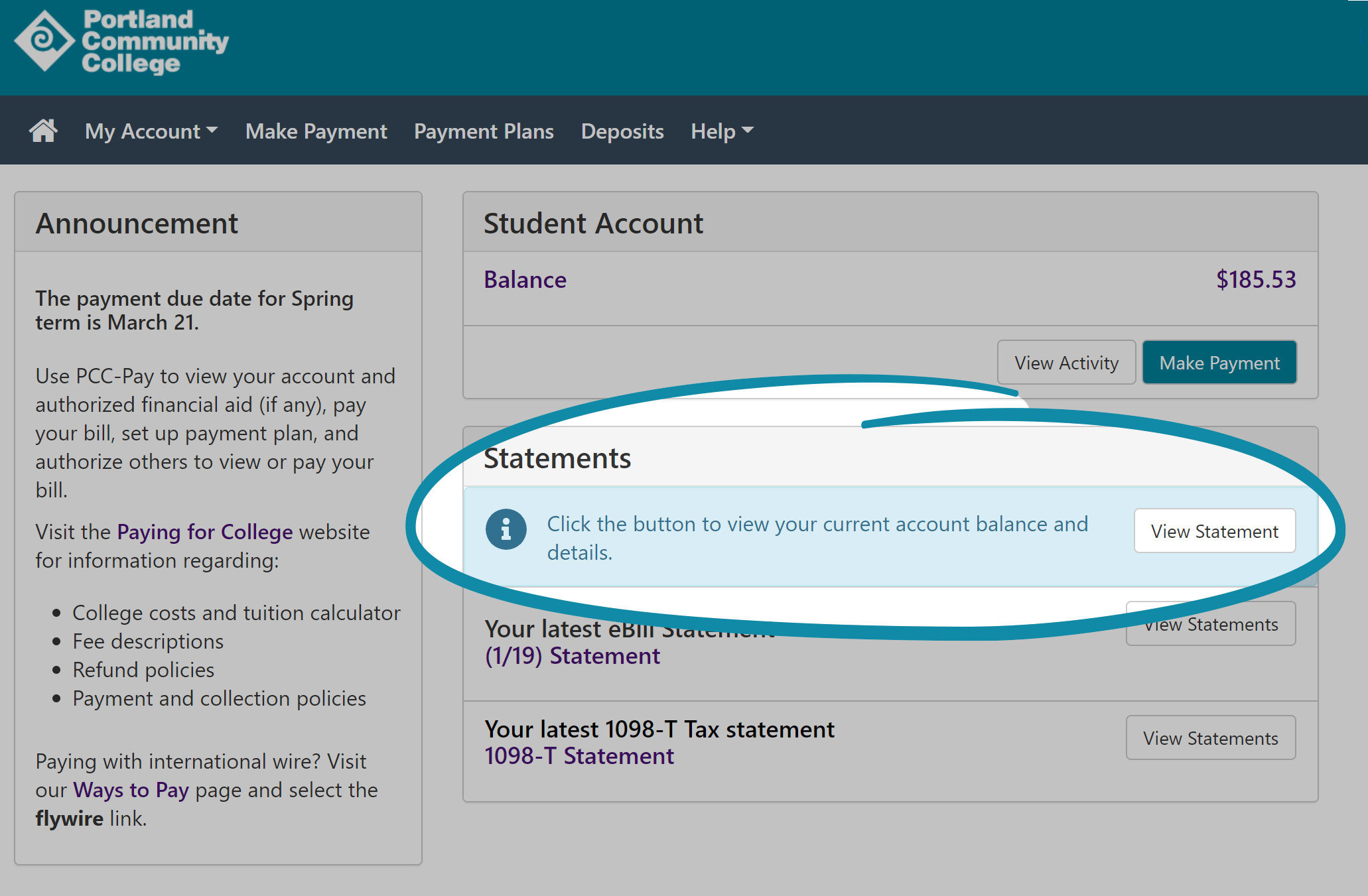
On demand statements are an easier way to get your current billing statement whenever you may need it. On your PCC-Pay dashboard, click the button to view statements.
What is PCC-Pay?
PCC-Pay is the online system you will use to view and pay your bill. You get to PCC-Pay via the MyPCC Paying for College tab. With PCC-Pay, you can:
- Make a payment
- Set up a payment plan
- Authorize others to pay your bill
- See the details of your bill
- Set up text alerts for billing notifications
Make a payment
You can pay online using a debit or credit card (Visa or MC) or by eCheck. To pay your bill, go to the MyPCC Paying for College tab and click view my bill in PCC-Pay, and then click Make a Payment.
Is it safe to pay online?
Yes. Making payments using PCC-Pay is actually slightly safer than paying in person or by mail. Your data is encrypted and is certified by VeriSign, the nation’s largest online payment verification provider. To protect your confidential information, PCC-Pay meets the highest level of Payment Card Industry standards enacted by Congress, including advanced intrusion detection and firewall systems. When you pay in person or by phone the cashier will enter the credit card number in the same online system as you would use.
Can I make a partial payment?
No. The college requires you to pay the full amount due but does offer convenient payment plans to make paying a bit easier. If you are expecting payment from another source that hasn’t come in, you will need to contact Student Account Services directly to make arrangements.
What is an eCheck?
An eCheck is an electronic withdrawal from a checking account or savings account at any bank or credit union in the U.S. It is also called an ACH (Automated Clearing House) payment. To pay by eCheck, you need to enter your banking information into the PCC-Pay system. Make sure your account number is entered correctly – payments which are rejected due to inaccurate account numbers are subject to a returned item fee.
Is there a fee to use PCC-Pay?
No. There is no cost to pay your bill in full via PCC-Pay. However, there is a small fee to set up a payment plan. Payments rejected due to inaccurate account numbers, closed or invalid accounts, or insufficient funds are subject to a returned item fee.
How quickly would a financial hold be released if I pay online?
When you pay your balance in full using PCC-Pay, any financial hold on your account will be automatically released within one hour.
Can I tell which account I used to make my payment?
Yes. You will be able to see the last 4-digits of the account number you set up to make the payment. This information is stored in your payment history. However, for your security, no one, not even you or PCC staff, will be able to view the full account number once it has been entered.
Set up a payment plan
You can use PCC-Pay to set up a College Account Payment Plan – see more on the Payment Plan page.
Authorize others to pay your bill
You can authorize someone else, such as a parent or spouse, to view and pay your bill online. To do this, select the Authorized Users option in PCC-Pay. Once the authorized payer is set-up, they will receive an email with the PCC-Pay link and the unique login name and password you set up.
What emails will my authorized payers receive?
In addition to receiving eBill notices, your authorized payers will also receive an email any time you make a change to their accounts, and when they make a payment on your behalf. If you only want them to receive the bill, you can set them up as your secondary email address under User Preferences. Important! Be sure to provide valid email addresses for your authorized payers.
Can I set up my employer or financial sponsor as an authorized payer?
It depends. This may work for a small company or agency who is sponsoring fewer than five students. However, many area employers already have billing arrangements with the college. Please refer to third party billing webpage, and contact your employer to see if they already have billing arrangements with the college.
If your sponsor does not already have billing arrangements with the college. You may set them up as an authorized payer using PCC-Pay. To do so, log in to MyPCC and select the Paying for College tab. Click view my bill in PCC-Pay. Select the ‘Authorized Payer’ link to assign them a user name and password. It will be your responsibility to update or delete the sponsor after they are done paying your bill.
What if the person paying my bill doesn’t have a computer?
You can print a copy of the eBill and provide it to them. The detailed statement in PCC-Pay has the same information as a paper bill. Computers are available at each campus and at libraries throughout the community.
What if my authorized payer forgets their password?
You can reset the password online through PCC-Pay and a new one will be sent to your authorized payer by email. To do so, log in to your MyPCC account and click the PCC-Pay link on the Paying for College tab.
If you are an authorized payer who has forgotten their password, please contact the student to have them reset the password for you. You will be asked to change this password the next time you log in.
What information my authorized payer see?
People you authorize will be able to view their own payment information and history and your eBills and current account activity. They will not be able to see your enrollment, grades, financial aid or any payment information you have stored.
Can I see my authorized payers account information?
No. Only the payer will be able to view their own confidential account information. In the interest of security and privacy, each user you authorize is assigned a separate username and password to access account and payment history.
Can I delete access to an authorized payer?
Yes. Click view my bill in PCC-Pay on the Paying for College Tab of MyPCC. After you access your authorized payer list, you will see a delete button next to the name. An email notification will be sent to the payer.
Viewing your eBill
An eBill is an electronic billing statement that shows the charges on your student account as of a particular date. EBills are sent to your MyPCC email weekly starting three weeks before term begins. You can also access your eBill via the MyPCC Paying for College PCC-Pay link.
What if I register after eBills are sent?
Your payment will be due immediately and you will not receive a bill. Instead, your account balance will be displayed on the MyPCC Paying for College tab.
Does the eBill have to be sent to my MyPCC email account?
Yes, since that is an official means of email communication for the College, however you may have all your MyPCC email forwarded to another email address. As a student, you need to check your MyPCC email account regularly. Emailed information is important to maintaining your relationship with the College. You are responsible for all information sent to you via your MyPCC email account. You may forward your MyPCC email but you are still responsible for reviewing all information sent. PCC will not be responsible for mail that does not reach the student when a forwarding address is changed or terminated, or for reasons such as Mailbox Full.
Why is the amount on my eBill different than what I see online?
The bill is a snapshot of your account as of a specific date and time. The amount will be different if any new charges or payments have been posted to your account after the bill was issued. Use the On Demand Statement feature to print a new bill with your current account activity.
Can I get a paper bill instead?
Use the On Demand Statement feature to view and print a billing statement any time!
In PCC-Pay, click the View Statement button.
All students who have registered using MyPCC will receive an eBill. You can print a copy of your eBill if you need a paper copy. If you are having problems printing your eBill, please call the Student Help Desk at 971-722-8222.
You may request a paper bill by sending an email to student.accounts@pcc.edu or by calling 971-722-8888, option 3.
You must make a new request each time you want a paper bill to be mailed. If you have disability concerns or are otherwise unable to use a computer, you may complete an eBill Exemption Request Form to request paper bills on a temporary or permanent basis. Former and non-enrolled students, and students who have never registered using MyPCC will receive paper bills.