
Report an Issue – Issue Type Descriptions
When submitting a support request to PCC IT, you will be asked to select a User Issue Type:
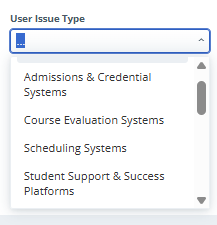
This helps us properly route your support request to the proper team. Here is a brief description of what each Issue Type is related to:
User Issue Type Descriptions
- Admissions & Credential Systems: Issues within ALEKS, Slate, NSC Reporting, or Parchment.
- Course Evaluation Systems: Resetting individual student class evaluations, correcting faculty access to their own Course Evaluations
- Class Video & Instructional Tools: Crash or error messages inside Zoom and other video and instructional platforms.
- Classroom & Event Technology: Broken equipment in classrooms, hybrid spaces, or event setups.
- Computer, Software & Printing: Physical computer damage, devices that won’t turn on, or hardware failures.
- Course Evaluation Systems: Data entry issues in Issues in Banner, Workday or Astra Schedule relating to course and section management and room reservations
- D2L Brightspace: Glitches within D2L, course visibility issues, or Kaltura/MyMedia errors.
- Information Security: Reporting suspicious emails, suspected malware, or a compromised account.
- Network & Connectivity: Inability to connect to PCCWifi, Eduroam, or PCCGuest networks.
- Phones & Voicemail: Desk phone errors, voicemail resets, or institutional cell phone issues.
- Student Support & Success Platforms: Glitches within Forage (EAB), GRADPlan (DegreeWorks), Navigate360 (EAB), Panther Hub (Campus Groups), Panther Works (Symplicity CSM), or Panther Pantry (Pantry Soft).
- Student System Processes: Issues for workflows and processes that are multi-system and affect student systems or student information.
- Websites & Intranet: General errors or downtime on MyPCC, the public website, the Intranet, or WordPress sites.
- Workday & Banner: Direct issues with Banner, Workday, payroll modules, or ChromeRiver. Failures or errors when generating or running reports in Argos, Tableau, or Banner.