Captioned Media on YouTube
YouTube
Don’t be fooled by YouTube’s auto-generated captions. Almost all YouTube videos have a CC button, but be warned, they could be auto-generated captions that are not completely accurate and are missing punctuation. Machine generated captions are not considered adequate for the public website or for instructional materials when a student needs them.
To search for videos captioned by a human and not auto-generated, follow this easy search technique.
- Enter your search term (for this example, let’s say I’m searching for videos on volcanoes) in the YouTube search field.
- Add a: , CC (that’s a comma, CC)
- Hit Enter or click the magnifying glass icon.

Verifying captions are not auto-generated
To determine if a YouTube has auto-generated captions (consider these as uncaptioned) or captions done by a human (much preferred),
- Click on the Settings button in the bottom right corner of the video player.
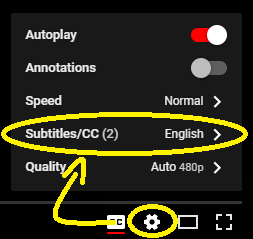
- Choose Subtitles/CC
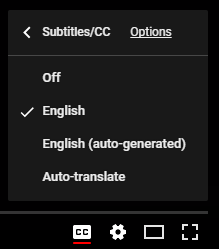
- Make sure there is an English option, and not just an English (auto generated) option.