
Step-by-step guide to accepting your award
Step one
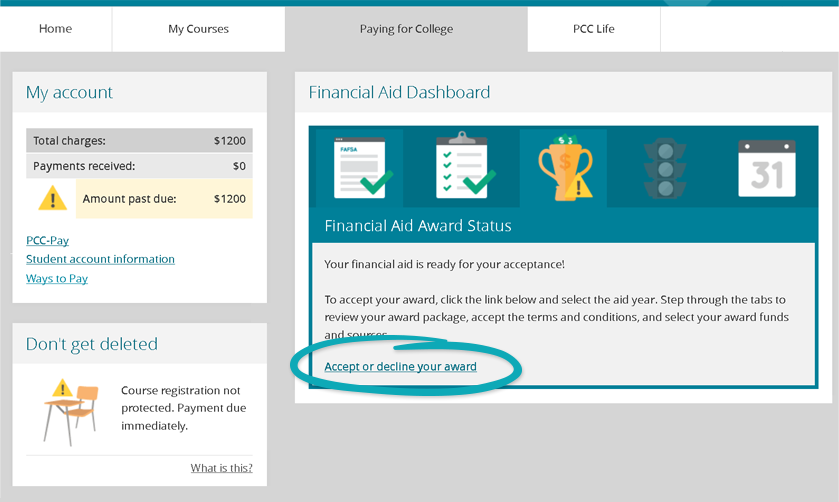
- Log in to MyPCC and go to the Paying for College Tab.
- Review the information in the dashboard, including the options available to you and ways to consider long term financial needs.
- Click Accept or decline your award.
Step two
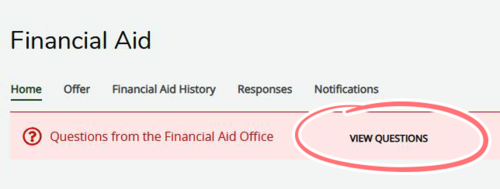
- Go to the Home tab and view questions.
- Select Yes for Authorization to Deduct Charges if you want to use financial aid at the bookstore.
- Click the Submit button.
Step three
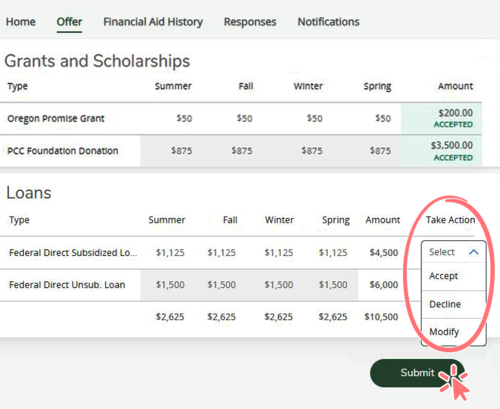
- Go to the Offer tab to review award amounts.
- Grants don’t have to be repaid and they are automatically accepted.
- You can accept all, part or none of the loans. Carefully consider how much money you need to borrow in student loans. If possible, try to avoid Unsubsidized Loans.
- Do not leave any part of your award undecided or we cannot release your award package. Accept or decline each part of your award.
- Click the Submit button.
Step four
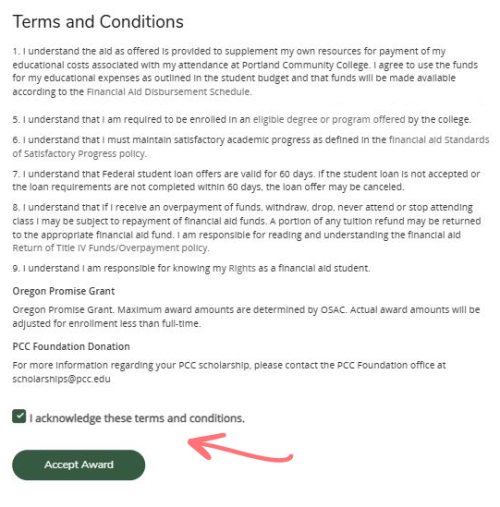
- Acknowledge the terms and conditions by clicking the checkbox.
- Click the Accept Award button to accept your award.