
Plain Language 101
What is Plain Language?
A quick overview of plain language principles and definition.
Benefits of Plain Language
Overview of of the benefits and the value of plain language.
Getting Started With Plain Language
Introduction to the basic steps to start using plain language in your writing.
Additional Resources
Access a printable/Google Document version of this web resource, links to training, and more in-depth guides.
What is Plain Language?
Plain language is writing so your readers will know how to act on the information they read
It is writing that is:
- Clear
- Concise
- Well-organized
- Easy for the intended audience to understand
It is writing so your audience can:
- Find what they need
- Understand what they find
- Use what they have read or heard to meet their needs
Plain language is not simplifying the topic. It simplifies the communication of it.
What plain language is not:
- Dumbing down
- Writing less precisely
- Making content less technical
- Only about using simple words and short sentences
Benefits of Plain Language
The Value of Plain Language
- Supports equity, inclusion, accessibility, and compliance (plain language is included in the Web Content Accessibility Guidelines)
- Gets your message across in the shortest time possible
- Provides fewer opportunities for misunderstanding
- Increases the number of people who will actually read, understand, and respond to what you have written
- Builds trust
Additional benefits of plain language
- Less resources spent on assisting people through processes
- Fewer errors on forms, applications, and in process navigation
- Less time spent addressing errors and questions
- More time for other tasks (and there are always more tasks!)
Getting Started With Plain Language
Identify your audience
- Who am I writing for?
- What is my purpose?
- Why do I want them to read this?
- What do they need?
- What do they already know?
Organize Information For Readers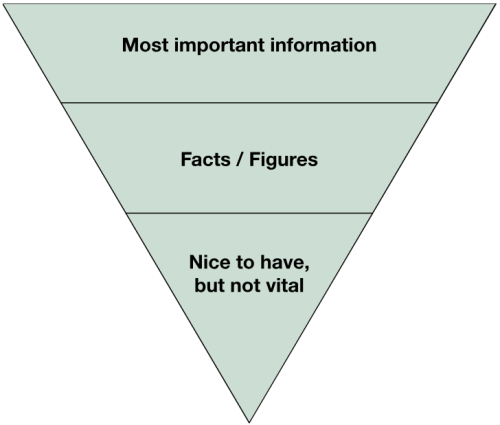
Prioritize:
- Most important information
- Facts and figures
- Nice to have, but not vital
Focus on the “you” not the department/institution/organization
A direct, active voice and tone helps to engage readers. There is no mistake who is performing the action, and what the action is. Active voice contributes to clarity.
Examples:
- Passive Voice: The application is being processed by me. Active Voice: I am processing an application.
- Passive Voice: Her locker will be unlocked. Active Voice: Someone will unlock her locker.
- Passive Voice: The parking spot was blocked by a van. Active Voice: A van blocked the parking spot.
- Passive Voice: Course enrollments must be completed by Friday. Active Voice: You must enroll in this course by Friday.
Design content to help readers see and understand
- Use headers and sub-headers to organize the information
- Use typography (font, size, color, bold, etc.) to guide the reader’s attention
- Use whitespace to organize the information
- Use images to make content easier to understand
- Structure the content to guide the reader through it
Design considerations – before and after examples
Before
If this is your first time at PCC or if you are returning after an absence apply to PCC. Complete the admission application by the application deadline. Applying is free and only takes a few minutes. Next, complete the orientation. Upon admission, you will receive an email with a link to the online orientation. Check the email account you used when you completed the application. Then, set up your MyPCC account. After completing the orientation, set up your MyPCC account. MyPCC is where you’ll go to sign up for classes, check your student email, pay for classes, and more.
After
If this is your first time at PCC or if you are returning after an absence apply to PCC:
- Complete the admission application by the application deadline.
Applying is free and only takes a few minutes. - Complete the orientation.
Upon admission, you will receive an email with a link to the online orientation. Check the email account you used when you completed the application. - Set up your MyPCC account.
After completing the orientation, set up your MyPCC account. MyPCC is where you’ll go to sign up for classes, check your student email, pay for classes, and more.
Additional Resources and References
- Quick Intro to Plain Language Guide Google Document – Access the content of this webpage in a Google Document formatted for printing and sharing.
- Plain Language Basics – A 2 hour and 50 min video training by Katherine Spivey from digital.gov
- The Center for Plain Language – The Center for Plain Language is a non-profit organization that helps government agencies and businesses write clear and understandable communications. The Center supports those who use plain language, trains those who should use plain language, and urges people to demand plain language in all the communications they receive, read, and use.
- Plain Language Guide Series – Guides from digital.gov to help you to understand how to create, design and test content so your specific audience understands it.